
Monitor Prompts
Monitor prompts are the list of questions MaxAEO asks each AI platform every day. You maintain this list under the Prompt Management tab on the Products page: the system asks every prompt on the selected AI platforms, then measures how their answers mention your brand. Every metric you see — Mention Rate, Competitive Rank, Avg Position — is built on top of this list.
In other words, the quality of your prompt list is the quality of your monitoring data. The closer your prompts are to what real users actually type, the more accurately your data reflects how your brand performs in AI search.
Prompts are not keywords
Section titled “Prompts are not keywords”If you come from SEO, your first instinct may be to paste in your keyword list. That’s the most common mistake — users ask AI complete questions, not keywords.
Take “AI brand monitoring” as an example:
| Traditional search (keyword) | AI search (full question) |
|---|---|
| ai brand monitoring | What’s the best tool to track how AI chatbots talk about my brand? |
| ai brand monitoring pricing | How much does it cost to monitor my brand across ChatGPT and Perplexity? |
| ai brand monitoring comparison | What’s the difference between tool A and tool B for AI visibility tracking? |
A single keyword hides a dozen different questions, and each question can produce a different set of recommendations. So when writing prompts, put yourself in your target user’s seat and write the exact sentence they would type into the chat box — with context, constraints, and a question — not a pile of nouns.
A tour of the Prompt Management tab
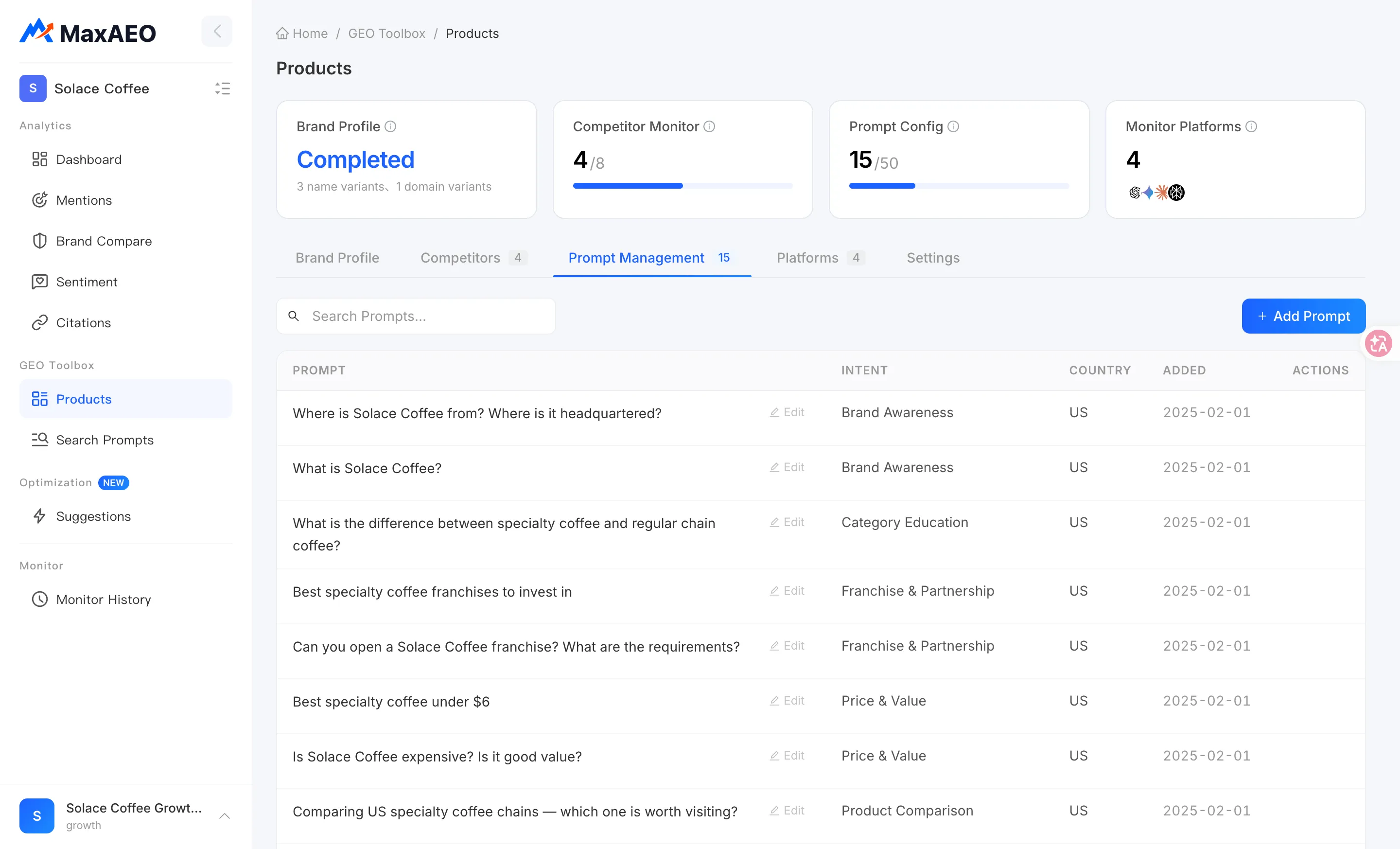
Section titled “A tour of the Prompt Management tab”Open Products. The Prompt Config overview card at the top shows how many monitor prompts are configured; switch to the Prompt Management tab to see the full list.
Each row in the list is one prompt, with these columns:
- Prompt — the question text;
- Intent — the intent category the question belongs to (see the nine categories below); shows “No intent” if unset;
- Country — the country/region the prompt targets;
- Added — when the prompt was added;
- Actions — edit and delete controls.
Add a prompt
Section titled “Add a prompt”-
On the Prompt Management tab, click Add Prompt.
-
Enter the question to monitor — write a complete question, phrased the way a real user would ask it.
-
Optionally choose an Intent and a Country, then click Add.
Edit, delete, and search
Section titled “Edit, delete, and search”- Edit — use a row’s edit action to change the prompt text, intent, or country;
- Delete — use the delete action and confirm; the prompt is removed from the list;
- Search — when the list gets long, type into Search Prompts… to filter; if nothing matches, click Clear search to restore the full list.
Nine intent categories: label every prompt
Section titled “Nine intent categories: label every prompt”When adding or editing a prompt, you can assign it one of nine Intent categories:
| Intent | Example question |
|---|---|
| Product Recommend | What’s the best AI brand monitoring tool? |
| Category Consult | Do SaaS startups actually need AI search monitoring? |
| Feature Learn | Does tool X track Perplexity citations? |
| Product Compare | Tool A vs tool B — which should I pick? |
| Brand Evaluate | Is tool X reliable? |
| Word of Mouth | What do users say about tool X? |
| Price Consult | How much does AI brand monitoring cost per month? |
| After Sales | Can I cancel tool X anytime and get a refund? |
| Purchase Channel | Where’s the best place to subscribe to tool X? |
Intents aren’t decorative: in the Mentions detail table, every prompt is shown with its intent, so you can spot structural gaps like “AI never mentions me in recommendation questions but does in word-of-mouth questions” — and fix them with targeted content. If you’re unsure which category fits, leave it unset and come back later.
The three-layer framework: Awareness, Consideration, Decision
Section titled “The three-layer framework: Awareness, Consideration, Decision”Above the nine intents, MaxAEO organizes prompts into three layers — Awareness / Consideration / Decision — mapping the buyer journey from “I have a need” to “I’m buying”. The first batch of prompts generated by the New Project Wizard is grouped exactly this way:
- Awareness (Category & Needs) — the user has just recognized a need and doesn’t know the options yet. These are category questions that usually contain no brand name, like “what’s the best AI brand monitoring tool”. This layer decides whether AI introduces you to new users at all;
- Consideration (Comparison & Review) — the user has a shortlist and is comparing. These are comparison and review questions, like “tool A vs tool B — which should I pick”. This layer decides how AI ranks you within the shortlist;
- Decision (Purchase & Evaluation) — the user has mostly decided and is clearing final doubts. These cover price, reputation, support, and where to buy, like “can I cancel tool X anytime”. This layer decides whether AI talks the user out of it at the last step.
Roughly mapping the nine intents: Category Consult and Product Recommend lean Awareness; Product Compare and Feature Learn lean Consideration; Brand Evaluate, Word of Mouth, Price Consult, After Sales, and Purchase Channel lean Decision. Checking your list against this framework is far more effective than brainstorming prompts one by one.
Four tips for writing good prompts
Section titled “Four tips for writing good prompts”-
Mimic how real users ask. Write full sentences a user would actually type, including audience, scenario, and constraints (“for a 10-person startup”, “under $200/month”, “for the US market”). The closer to real phrasing, the more your monitoring results are worth.
-
Cover every stage of the buyer journey. Don’t pile the whole list into one layer. Monitor only Awareness and you’ll never know how AI reviews you during comparison; monitor only Decision and you’ll never know whether AI introduces you to new users. Use the three-layer framework to spread prompts across all stages.
-
Don’t write only brand-name questions. This is the second biggest mistake after keyword thinking. Questions containing your brand name (“is tool X reliable”) only measure how AI perceives and evaluates you; brand-free category questions (“what’s the best tool for this”) measure whether AI proactively recommends you — and that is the core battleground of AEO. A healthy list keeps a substantial share of brand-free questions.
-
Use intents to keep the list balanced. Assign an intent to every prompt, then scan the list by intent to see which categories are thin — and fill them.
Don’t want to write them by hand? Let Search Prompts generate them
Section titled “Don’t want to write them by hand? Let Search Prompts generate them”If your list is still empty — or you worry you’re missing question patterns worth monitoring — use Search Prompts: enter your website URL, and the system crawls your site, discovers search topics, checks search heat, and generates a batch of candidate prompts labeled Awareness / Consideration / Decision with heat scores. Select the ones you want and click Add to Product to write them into your current list in bulk (the prompt quota still applies). See Search Prompts.