
Mention Rate
Mention Rate is the percentage of monitored AI responses that mention your brand.
How it’s calculated
Section titled “How it’s calculated”The formula is simple:
Mention Rate = responses mentioning your brand / total responses × 100%Here’s a worked example: suppose a monitoring run sends your prompts to the AI platforms you track and collects 20 responses in total, and 8 of them mention your brand. Your Mention Rate for that run is:
8 / 20 × 100% = 40%Note that “total responses” is prompts × platforms: each monitored prompt is sent to every AI platform you’ve enabled, and each platform’s answer counts as one response. For example, 5 prompts × 4 platforms = 20 responses.
Whether the AI’s answer counts as a mention also depends on the Name Variants and Domain Variants you’ve configured in Products. The more complete your variants, the more accurately mentions are detected. If your Mention Rate looks suspiciously low, check your variants for missing spellings first.
Where to find it
Section titled “Where to find it”Mention Rate appears in two main places in MaxAEO, each with a different focus:
Dashboard
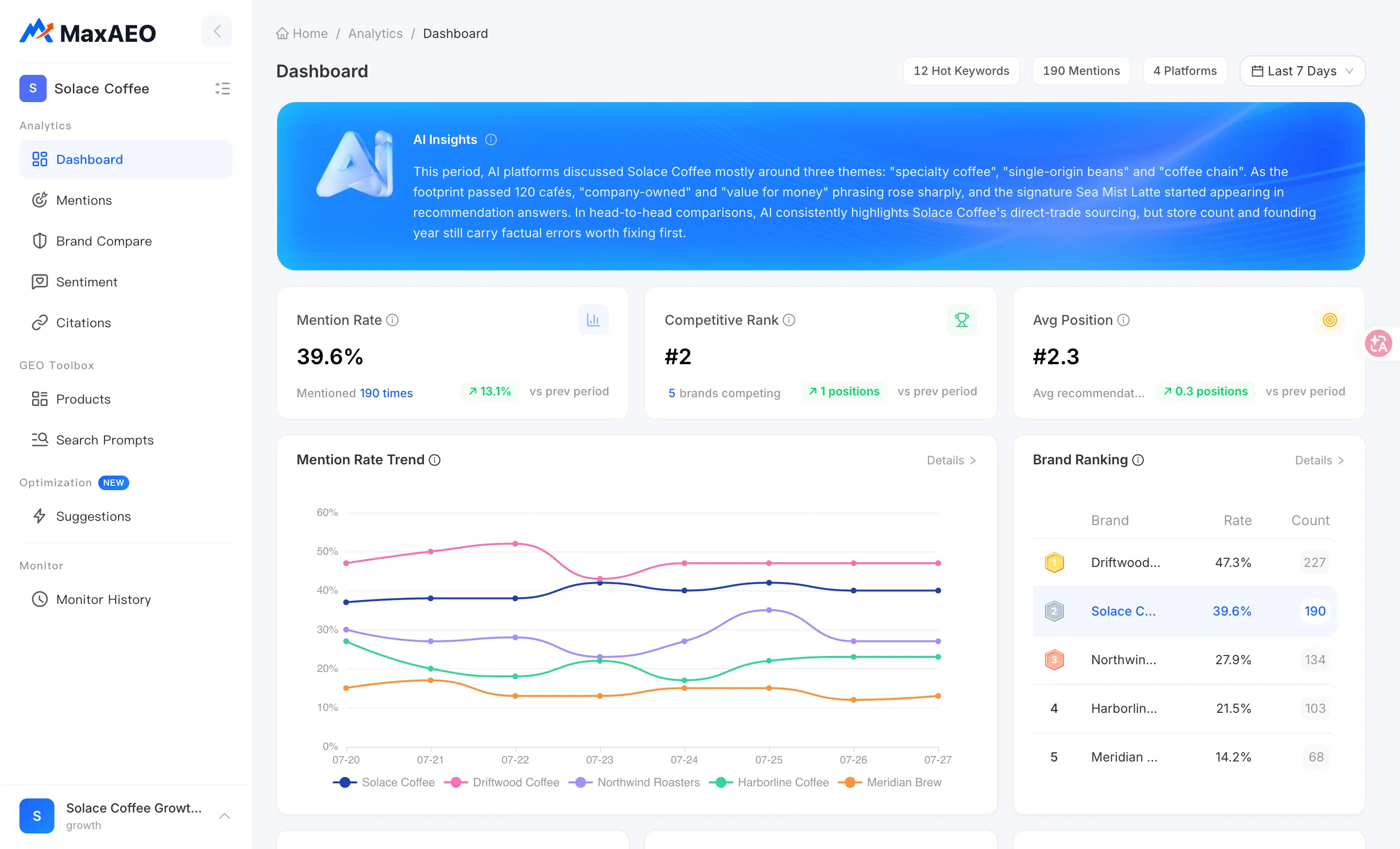
Section titled “Dashboard”The Dashboard shows Mention Rate as one of three KPI cards — the best place for a quick daily check:
- Mention Rate KPI card: the rate for the selected time range, the number of times you were mentioned, and the change vs the previous period.
- Mention Rate Trend line chart: your brand’s rate plotted against competitors, day by day across the selected range, with a Details view.
- Brand Ranking table: all monitored brands ranked by Mention Rate, with your brand highlighted.
- Platform Performance: your Mention Rate broken down by AI platform — variation between platforms is normal.
Use the filters at the top left to switch projects, select AI platforms, and adjust the time range (last 7/14/30 days or custom). Every card and chart updates with your filters.
Mentions page
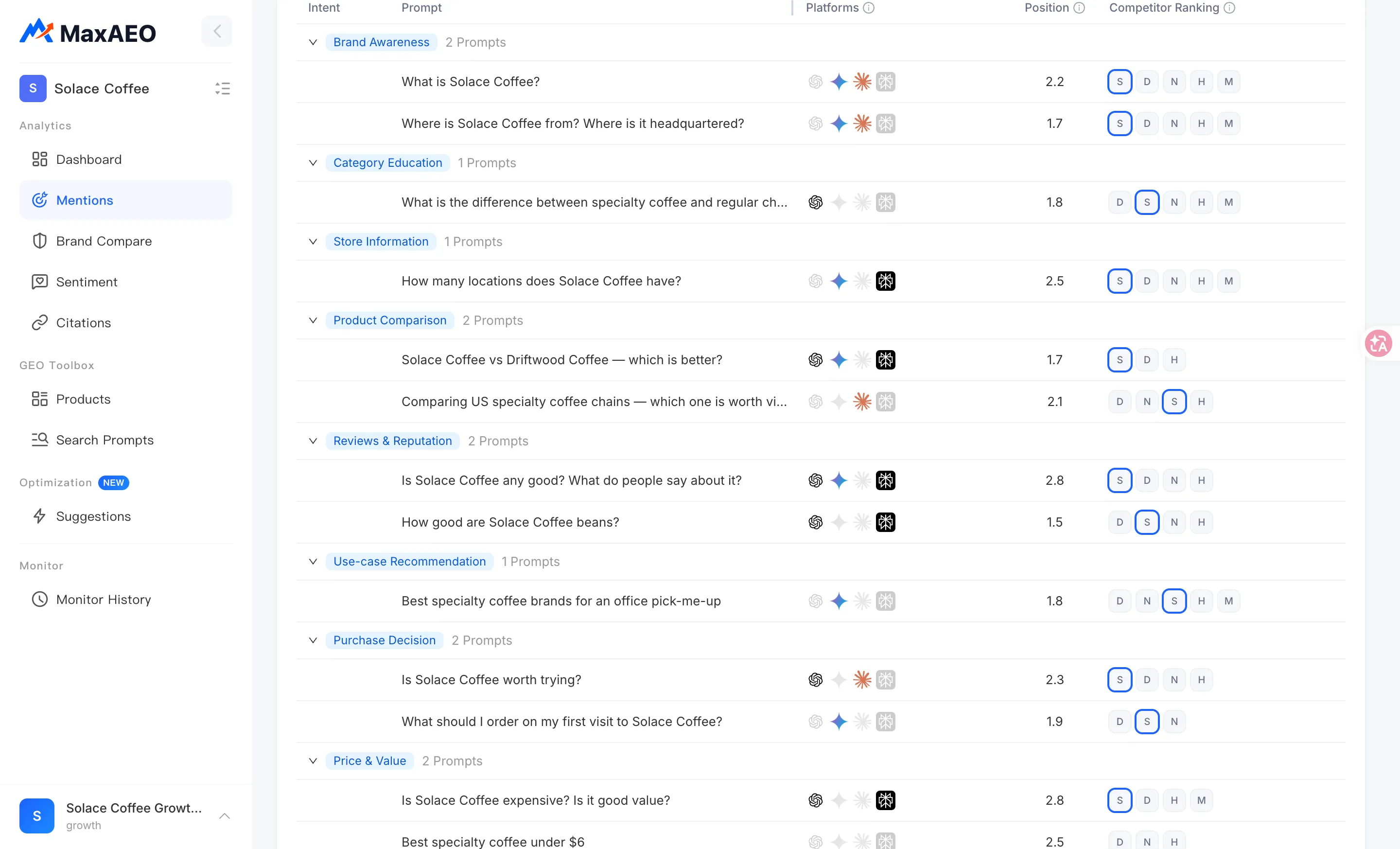
Section titled “Mentions page”The Mentions page breaks the data down by monitoring batch — the place to investigate exactly what happened in a specific run:
- KPI row: Mention Rate, Monitor Count (total monitoring batches), Avg Position, and Total Mentions (mentions vs total responses).
- The Mention Rate Trend chart plots one point per monitoring batch. Click any data point to load that batch’s details.
- The details table lists one row per prompt: intent, prompt text, platforms (colored icon = that platform mentioned you, gray = it didn’t), position, and competitor ranking. You can search prompts.
- Click a row to open Prompt Details: mention coverage (x/y queries mentioned), competitor ranking, and the full AI response from each platform with its citations — the ground truth for what the AI actually said.
Why it matters and how to read it
Section titled “Why it matters and how to read it”Watch the trend, not single points
Section titled “Watch the trend, not single points”A single run’s Mention Rate is subject to the inherent randomness of AI responses. Ask the same prompt today and tomorrow and the AI may name a different set of brands — that’s normal large language model behavior, not a data error. So:
- Don’t draw conclusions because the rate dropped from 42% to 35% on one day.
- Do watch the trend over 7–14+ days: a sustained climb means your optimization is working; only a sustained decline is worth investigating.
See the FAQ for more on why the numbers fluctuate.
Compare against competitors
Section titled “Compare against competitors”An absolute Mention Rate means little without competitive context. For example: a 30% rate is a big gap if your top competitor sits at 80%, but if every competitor is under 10%, 30% makes you the category leader. The Dashboard’s trend chart and Brand Ranking table build in this comparison, and your Competitive Rank is derived from exactly this logic.
Setting a benchmark
Section titled “Setting a benchmark”A “healthy” Mention Rate varies widely by category and competitive landscape — there is no universal number. Qualitatively:
- A rate clearly above your main competitors, holding steady or climbing, is a healthy position.
- A rate consistently below your main competitors, or near zero on certain platforms, signals clear room for optimization — the Optimization page’s action list is a good place to start.
Beyond Mention Rate
Section titled “Beyond Mention Rate”Getting mentioned is only step one. Where you appear in the recommendation list (Avg Position) and whether the AI speaks positively or negatively about you (Sentiment Score) determine what each mention is actually worth. Read the four metrics together.