
Plans & Quotas
MaxAEO is subscription-based. Every plan includes full 9-dimension analytics — the difference between tiers is purely monitoring scale: how many brands, search prompts, AI platforms, and competitors you can monitor, and how far back you can view your data.
Why quotas matter
Section titled “Why quotas matter”Whenever you add a competitor, create a prompt, or select AI platforms in the Product Center, MaxAEO checks your plan’s quota in real time. Knowing the limits up front lets you pick the right plan before you build out your monitoring setup, instead of getting blocked halfway through.
Plans at a glance
Section titled “Plans at a glance”MaxAEO has four tiers, priced in USD. Monthly and annual billing are priced independently:
| Starter Brand Check |
Growth Full GEO Monitoring |
Pro Multi-Brand Matrix |
Enterprise Unlimited Plan |
|
|---|---|---|---|---|
| Monthly price | $19/mo | $149/mo | $399/mo | Custom |
| Annual price (per month) | $15/mo | $119/mo | $319/mo | Custom |
| Brands (projects) | 1 | 1 | 4 | Unlimited |
| Search prompts | 10 | 100 | 400 | Unlimited |
| AI platforms | 4 | 4 | 4 | All (~8) |
| Competitors per brand | 5 | 8 | 8 | Unlimited |
| Data retention | 30 days | 90 days | 1 year | Unlimited |
| Monitoring frequency | Daily | Daily | Daily | Daily |
| Analytics | Full 9-dim | Full 9-dim | Full 9-dim | Full 9-dim |
A few notes:
- Growth is the recommended tier (marked “Most Popular” on the pricing page): 100 prompts is enough to cover a full question matrix for one brand, from awareness through decision.
- AI platforms is the number you can monitor at once. Around 8 platforms are available (ChatGPT, Gemini, Claude, Perplexity, and more) — Starter, Growth, and Pro let you pick any 4; Enterprise unlocks all of them. You can change your platform mix in the Product Center anytime; changes take effect on the next monitoring run.
- Data retention controls how far back you can look — see Data retention below.
Monthly vs. annual billing
Section titled “Monthly vs. annual billing”The pricing modal has a Monthly/Annual toggle at the top:
- Monthly: billed month to month at the monthly prices above.
- Annual: billed yearly at a lower effective monthly rate — roughly 20% off overall (for example, Growth drops from $149/mo to $119/mo).
Free accounts and trials
Section titled “Free accounts and trials”- Without a paid subscription, your account is in a free state with quotas well below the paid tiers, assigned by the system.
- New users may receive a Growth trial: during the trial you get Growth-level access, a “Your Growth trial is live” notice appears, and the user menu shows your remaining days.
- When the trial ends, you’ll see a “trial has ended” notice prompting you to start a subscription. Without one, your account returns to free-state quotas and retention limits.
What happens when you hit a limit
Section titled “What happens when you hit a limit”MaxAEO handles all five quota types the same way: existing configuration keeps working, but new additions are blocked.
- When you add a competitor, create a prompt, select more AI platforms, or create a new project, the system checks the relevant quota first.
- If you’re at the limit, the action isn’t saved. A “Plan limit reached” notice appears in the top-right corner, and clicking Upgrade opens the pricing modal directly.
- One special case: if the platforms you’ve selected exceed the target plan’s allowance (for example, you enabled extra platforms during a trial), subscribing shows a “Plan doesn’t fit your setup” notice — you can continue subscribing and then adjust your monitored platforms in the Product Center, or upgrade to a higher tier instead.
Data retention
Section titled “Data retention”Data retention limits how far back you can view history — it never interrupts daily monitoring. Take Starter (30 days) as an example: monitoring still runs every day, but the Dashboard’s date filter only covers the last 30 days. Selecting an earlier range shows “Current plan supports data from the last 30 days only.”
If you run quarterly reviews, pick at least Growth (90 days); for year-over-year comparisons, pick Pro (1 year).
How to upgrade or subscribe
Section titled “How to upgrade or subscribe”-
Open the user menu in the top-right corner and select “Plans & Pricing” to open the pricing modal.
-
Toggle Monthly/Annual at the top, then click “Get Started” on your target plan.
-
Complete checkout through Stripe. Once the payment-success confirmation appears, your subscription is active and your plan info and quotas reflect the new plan. See Payment & Orders for checkout details and order history.
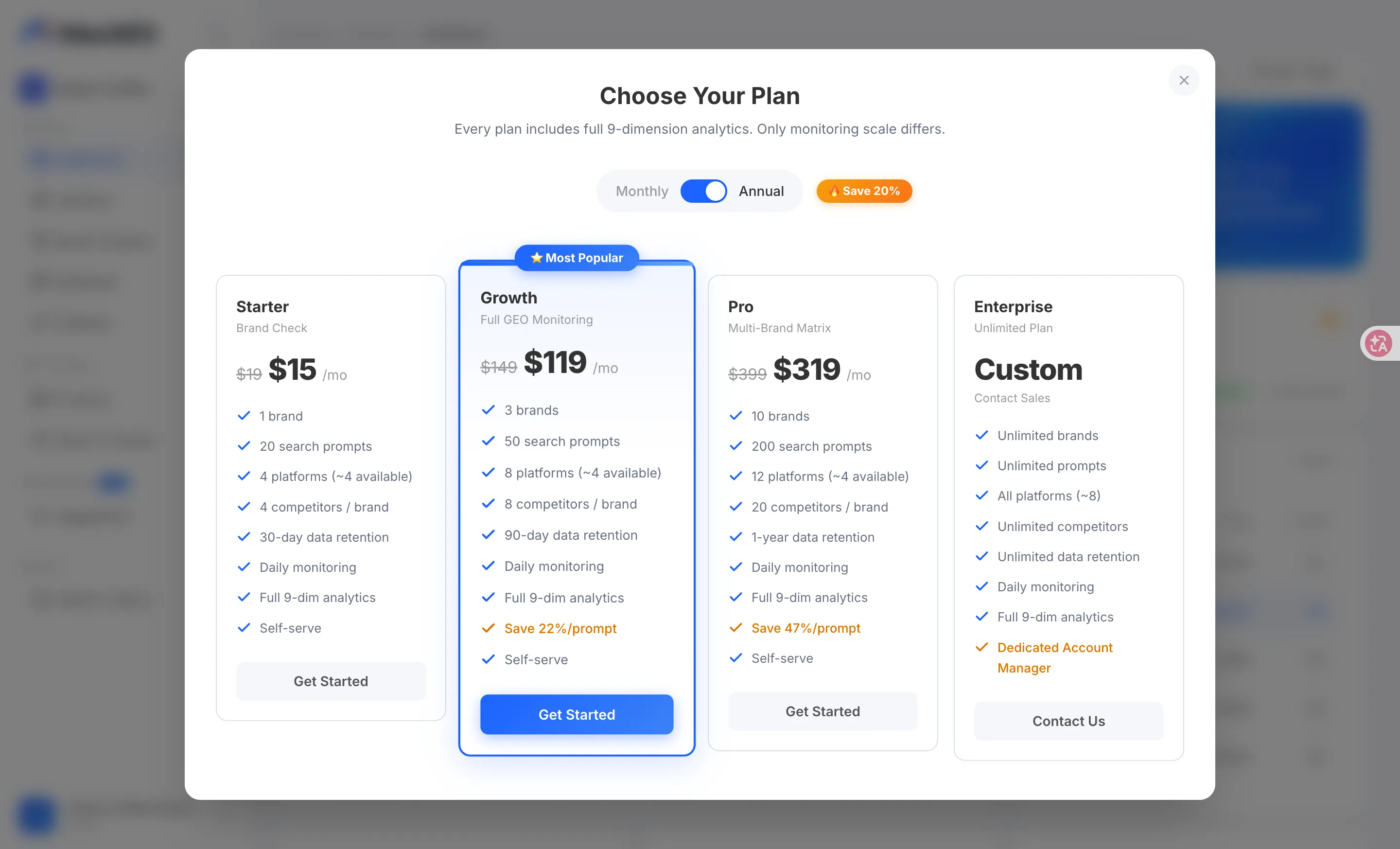
The Upgrade button in the quota-limit notice opens the same pricing modal.
Enterprise: beyond the standard tiers
Section titled “Enterprise: beyond the standard tiers”If you need more than 4 brands or 400 prompts, or you want every AI platform and unlimited data retention, the Enterprise plan is custom-built for you. Click “Contact Sales” on the Enterprise card in the pricing modal to submit your details, and a dedicated advisor will reach out — see Enterprise.