
Optimization Suggestions
Optimization Suggestions is where MaxAEO turns monitoring into action: every week it generates a batch of executable content actions from your live monitoring data — each one tells you where to publish, what to publish, and why, and comes with a publish-ready AI draft.
Why you need it
Section titled “Why you need it”Metrics like Mention Rate and Competitive Rank tell you where you stand, but not what to do next. You may know you’re never mentioned on certain prompts, or that competitors dominate a platform — yet you still have to decide which gap to close first, where to publish, and what to write.
Optimization Suggestions does that step for you. The system scans real AI answers to your monitor prompts, finds the arenas where competitors dominate and you’re absent, ranks the gaps by size, and gives you a channel, an angle, and a how-to for each — so you can just work top down. Every priority and rationale is computed from observed AI data, with no speculation.
How suggestions are generated: weekly refresh
Section titled “How suggestions are generated: weekly refresh”Suggestions run on a weekly cycle:
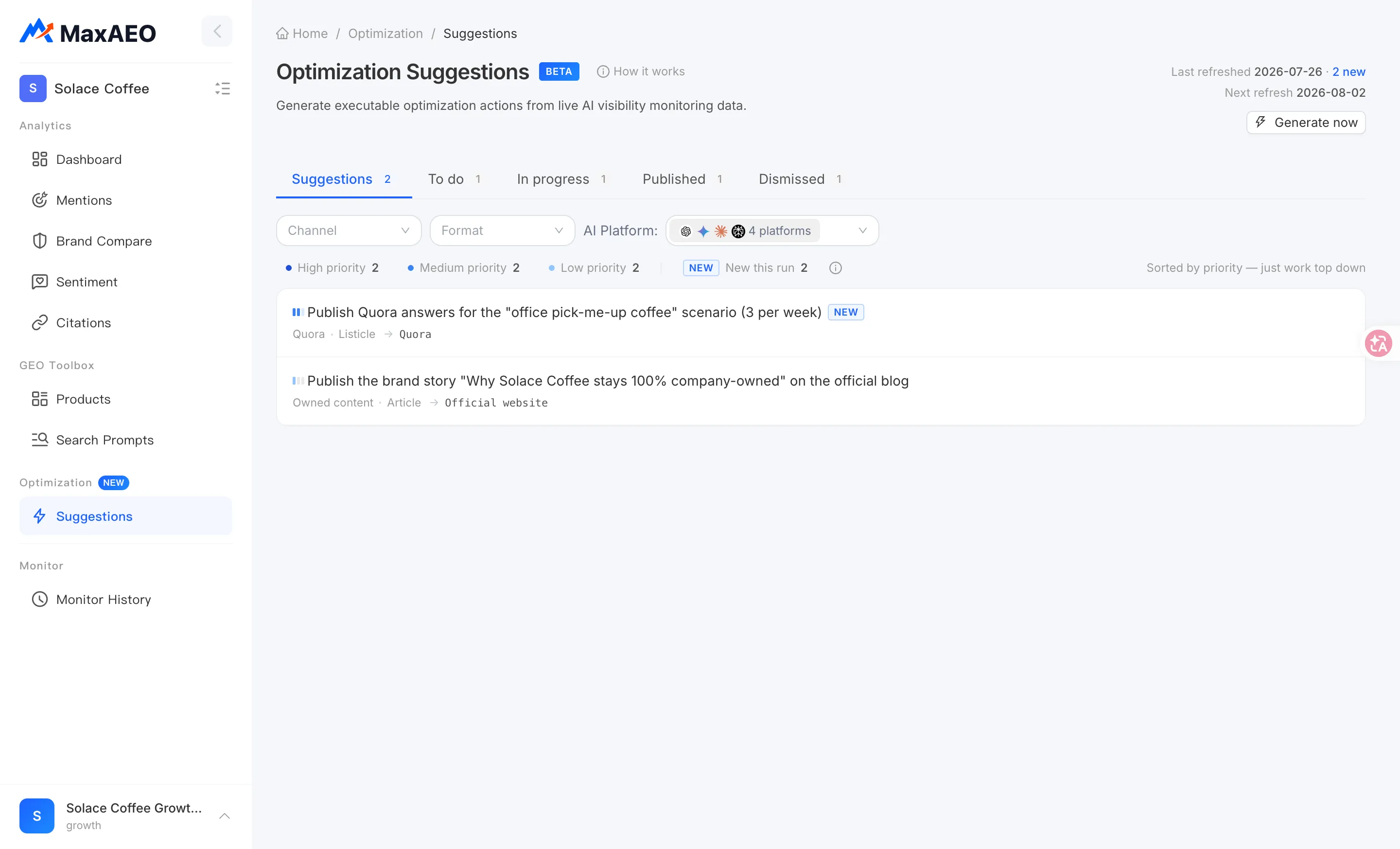
- Every Monday, the system automatically refreshes and generates this period’s actions. The page header shows the Last refreshed and Next refresh times, plus how many actions are new this run — newly surfaced actions carry a “New this run” chip.
- Don’t want to wait until Monday (say, you just created a project and have no suggestions yet)? Click Generate now to create a batch immediately. Generation takes a little while, and the page refreshes on its own when it’s done.
- If the current period already has a run, clicking Generate now simply shows the existing batch instead of generating a duplicate.
Priority: P0 / P1 / P2
Section titled “Priority: P0 / P1 / P2”The list is already sorted by priority, and as the page itself says — just work top down. Every action lands in one of three tiers:
| Tier | Meaning | How it’s assigned |
|---|---|---|
| P0 · High priority | Biggest gaps — close these first | Your mention rate across the prompts this action covers is below 55% |
| P1 · Medium priority | Clear room to improve | Mention rate 55% – 67% |
| P2 · Low priority | Nice to have | Mention rate above 67% |
Tiering looks at exactly one thing: your mention rate across the arena this action covers — the “arena” being the set of monitor prompts the action hits. The lower your rate, the more absent you are from those questions, and the higher the priority. Within a tier, actions are ordered by coverage — the number of prompts hit: a P0 action covering 8 prompts ranks above a P0 action covering 3.
A concrete example: action A covers 6 prompts where your average mention rate is 20%, action B covers 4 prompts where it’s 60% — A is P0, B is P1, and A sits above B.
The priority bar at the top of the page doubles as a filter: click a tier (or “New this run”) to see only those actions.
Filtering suggestions
Section titled “Filtering suggestions”Beyond priority, you can filter the list on three dimensions — handy for splitting work across your team:
- Channel: where the action suggests publishing, across 22 channels including owned content (your own site), Reddit, Quora, Medium, YouTube, GitHub, Stack Overflow, and Discord. See Publishing Channels for what each channel is good at.
- Format: comparison page, listicle, guide, review, Q&A, or article.
- AI platform: which AI platforms (such as ChatGPT, Gemini, Claude, or Perplexity) the action affects.
Click Clear filters at any time to reset.
The workflow: from suggestion to published
Section titled “The workflow: from suggestion to published”The page manages each action’s lifecycle across five tabs: Suggestions → To do → In progress → Published, plus Dismissed. A typical flow:
-
Pick actions from Suggestions: start with the highest-priority actions, open the detail drawer to check the rationale and evidence (next section), and click Add to to-do on the ones worth doing.
-
Start working: on the To do tab, click Start to move an action into In progress — anyone on your team can see at a glance that it’s being worked on.
-
Mark it published: once the content ships, click Mark published and fill in the publish date and the published URL (optional).
-
Dismiss what you won’t do: dismissing isn’t deleting — the action moves to the Dismissed tab, and you can Restore it any time. Keeping Suggestions clean means everything left is something you actually plan to do.
A published action can also be moved back with Move to to-do — but note this clears the published record (publish date and URL). You can mark it published again later.
The action detail drawer: why and how
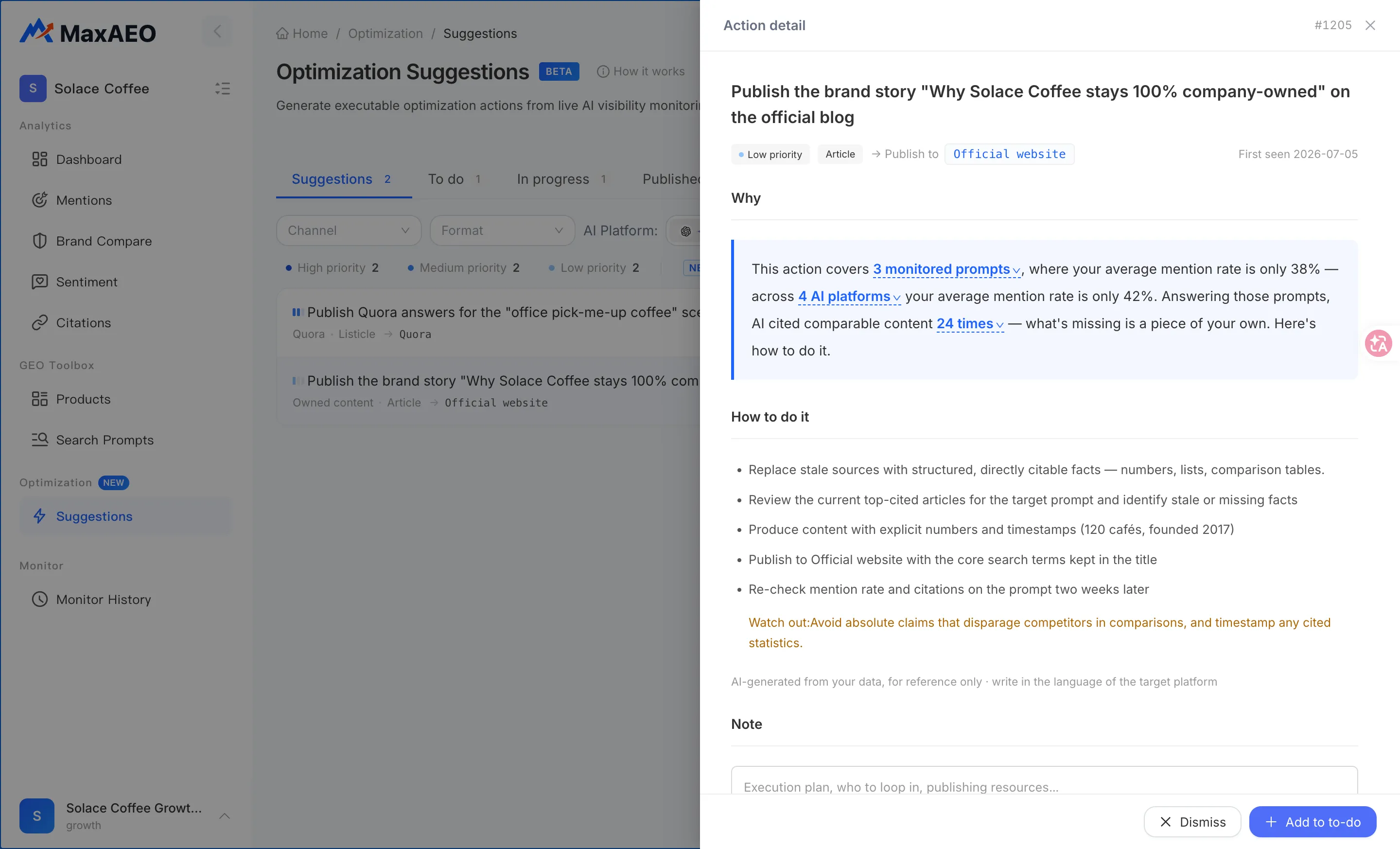
Section titled “The action detail drawer: why and how”Click any action to open its detail drawer — this is where you judge whether an action is worth doing:
- Why: the recommendation logic in one sentence, built entirely from monitoring data. For example: this action covers N monitored prompts, in N of them you are not mentioned at all, and your average mention rate across them is only x% — while AI cited comparable content N times answering those prompts. What’s missing is a piece of your own.
- Evidence: the raw backing — the prompts covered (sorted by your mention rate, lowest first), the AI platforms affected (with per-platform mention counts like “mentioned in 3/10 answers”), and the list of what AI actually cites — that is, where you need to show up. Content you own is labeled Owned, and each source shows how many times it was cited.
- How to do it: concrete execution guidance — where to publish, the angle to take, what to cover.
- Watch out: pitfalls to avoid while executing.
- Note: jot down your execution plan, who to loop in, or publishing resources — useful when working as a team.
The AI draft: proofread and publish
Section titled “The AI draft: proofread and publish”Every action comes with a draft article generated by the engine directly from your monitoring evidence. Click View draft in the detail drawer to preview it in a modal and copy it in one click.
Two things to know:
- The draft’s language follows the target channel: an action targeting Reddit or your English site produces an English draft.
- The draft is AI-generated from your data and meant as a starting point — proofread it for the target platform’s tone before publishing. You don’t have to start from a blank page.
How it works
Section titled “How it works”Click How it works in the page header for the full mechanism. In short, every Monday the system runs four steps:
-
Scan: pull the latest AI answers to your monitor prompts and identify the sources and brands they cite.
-
Find the gaps: rank gaps by your mention rate in each arena — the lower your rate and the more competitors are cited, the higher the priority.
-
Generate actions + drafts: every action comes with where to publish, the angle to take, and how to do it, plus a publish-ready draft.
-
Track impact (coming soon): add the published URL and the action moves into tracking; once AI citation detection ships, results fill in automatically with each weekly refresh.
Reading the page and taking action
Section titled “Reading the page and taking action”- Start at P0 and work top down: the list order is the recommended execution order — no need to re-prioritize yourself.
- Prioritize actions recommended several runs in a row: the gap has persisted, and the system keeps rating it high-value.
- Always add the URL after publishing: it’s the step that closes the loop from action to measurable impact.
- Cross-check with Citations: the “what AI actually cites” evidence draws on the same data as the Citations page — go there for the site-wide view of which sources AI relies on.
- Don’t try to empty the list: dismiss what you won’t do so Suggestions and To do only hold real plans — a short, honest list gets executed; a long one doesn’t.