
Citations
The Citations page answers one key question: which sources do AI answers about your category actually come from?
Use the filters at the top of the page to select AI platforms and adjust the time range (last 7 days by default); every module updates with your filters. The data comes from your monitoring runs — if there’s no monitoring data in the selected range, the page shows “No citation sources yet for the selected range.”
Source Analysis (treemap)
Section titled “Source Analysis (treemap)”What it is: a treemap showing the distribution of citation sources across AI responses in the selected range. Each block is one source (a media outlet or website), and larger blocks indicate higher citation frequency.
How to read it: at a glance, the biggest blocks are the sources feeding the AI the most right now. Look for two things:
- How much area your own domain occupies — if it’s tiny or missing entirely, the AI rarely cites you when answering questions about your category.
- Which third-party outlets dominate — they’re the content channels the AI currently trusts most.
How to use it: click any block to open a side drawer for that source, listing its top 10 cited articles. Each row shows the Article Title (click to open the original) and its AI Citation Rate, sorted by citation count.
Here’s a worked example for AI Citation Rate: suppose a tech outlet was cited 40 times in the selected range, and one of its articles — “The Best X Tools in 2026” — accounts for 10 of those citations. That article’s AI Citation Rate is 10 / 40 = 25.0% — it’s the single piece of content feeding the AI the most from that source.
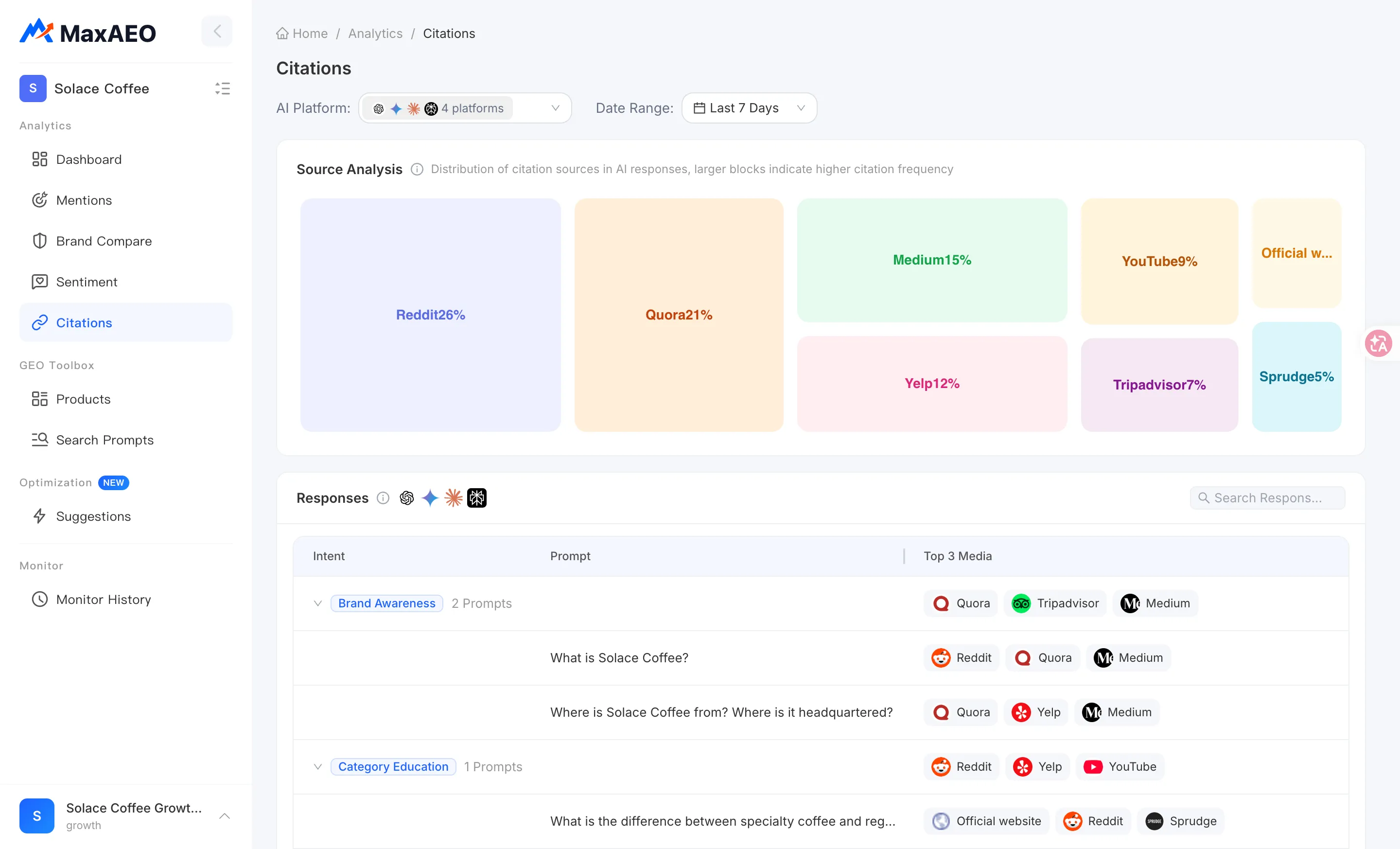
Responses list
Section titled “Responses list”What it is: a citation breakdown organized by monitored prompt, answering “who did the AI cite for each question?” The list is grouped by intent (such as product recommendation, brand comparison, and product review). Each intent row shows its prompt count and the group’s aggregated Top 3 Media; expand a group to see one row per prompt:
- Prompt: the monitored question — hover to see the full text.
- Top 3 Media: the three most-cited outlets in that prompt’s answers. If they don’t fit, click More to expand and Collapse to fold them back.
- Top Articles: opens the citation drawer for that prompt (see below).
How to use it: the search box (Search Responses…) filters prompts by keyword, and the footer shows the total Responses count.
How to read it: Source Analysis gives you the big picture; the Responses list works question by question. Within the same category, “which is best” and “how to choose” questions can have completely different source structures — going row by row is how you catch fine-grained gaps like “we’re completely absent from this high-value question.”
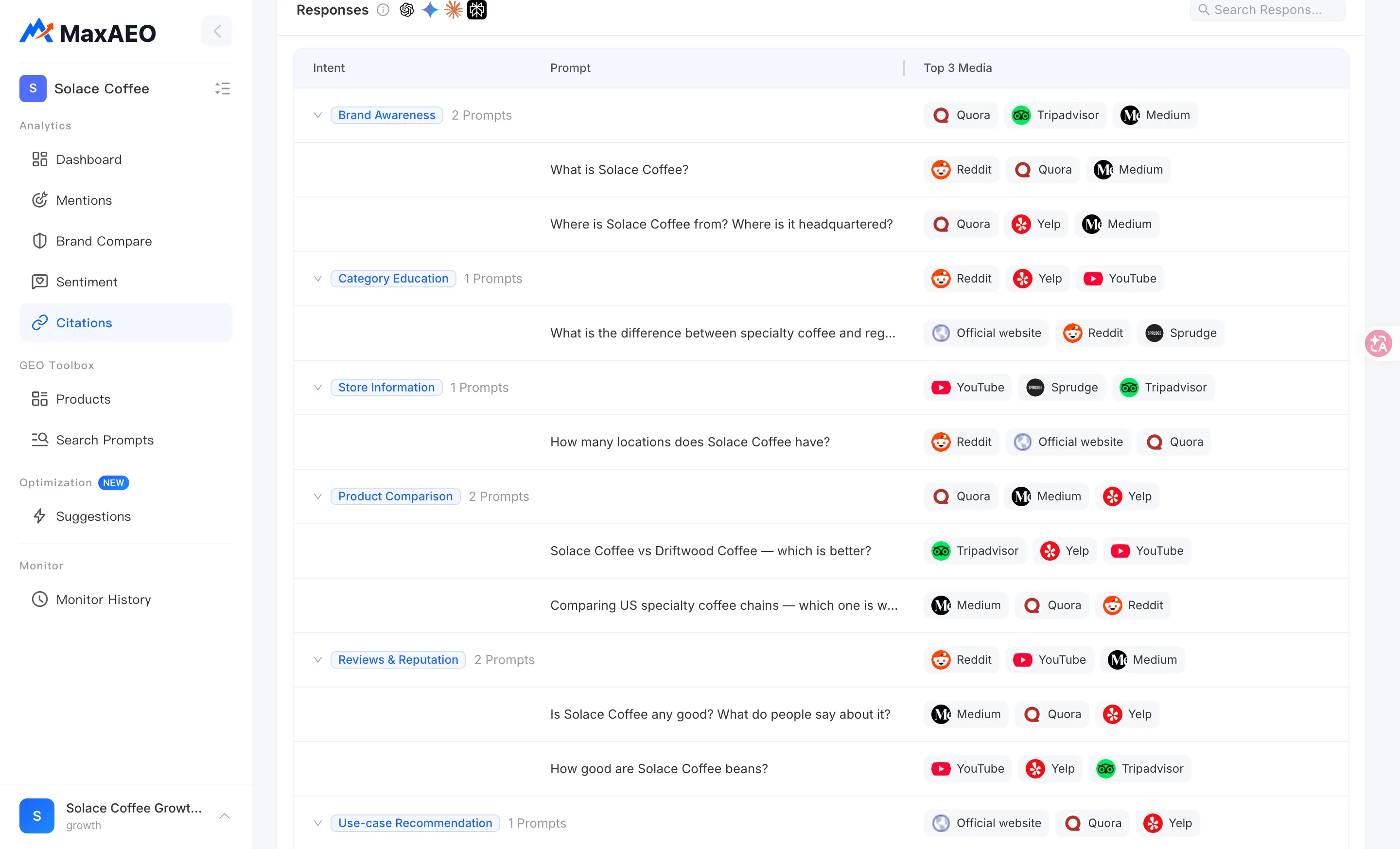
Citation drawer
Section titled “Citation drawer”Click any prompt row (or the citation badge at the end of the row) to open the citation drawer. The drawer is titled with the prompt itself and has two tabs:
Top Cited Articles tab
Section titled “Top Cited Articles tab”The top articles ranked by AI citation count. Each row shows the Article Title (click to open the original), its source outlet, and its Citations count; click the Citations header to toggle between ascending and descending order. This list is, quite literally, “whose homework the AI is copying for this question.”
AI Responses tab
Section titled “AI Responses tab”The AI responses this prompt produced across your monitoring runs, browsable page by page. Each record appears as a card: AI platform, monitor date, an answer summary, the number of Citation Sources, and the cited media tags. Click a card to open the full AI Responses view — the original question, the complete answer rendered in Markdown, and a numbered list of Citation Sources links at the end. This is the ground truth for exactly which links the AI cited.
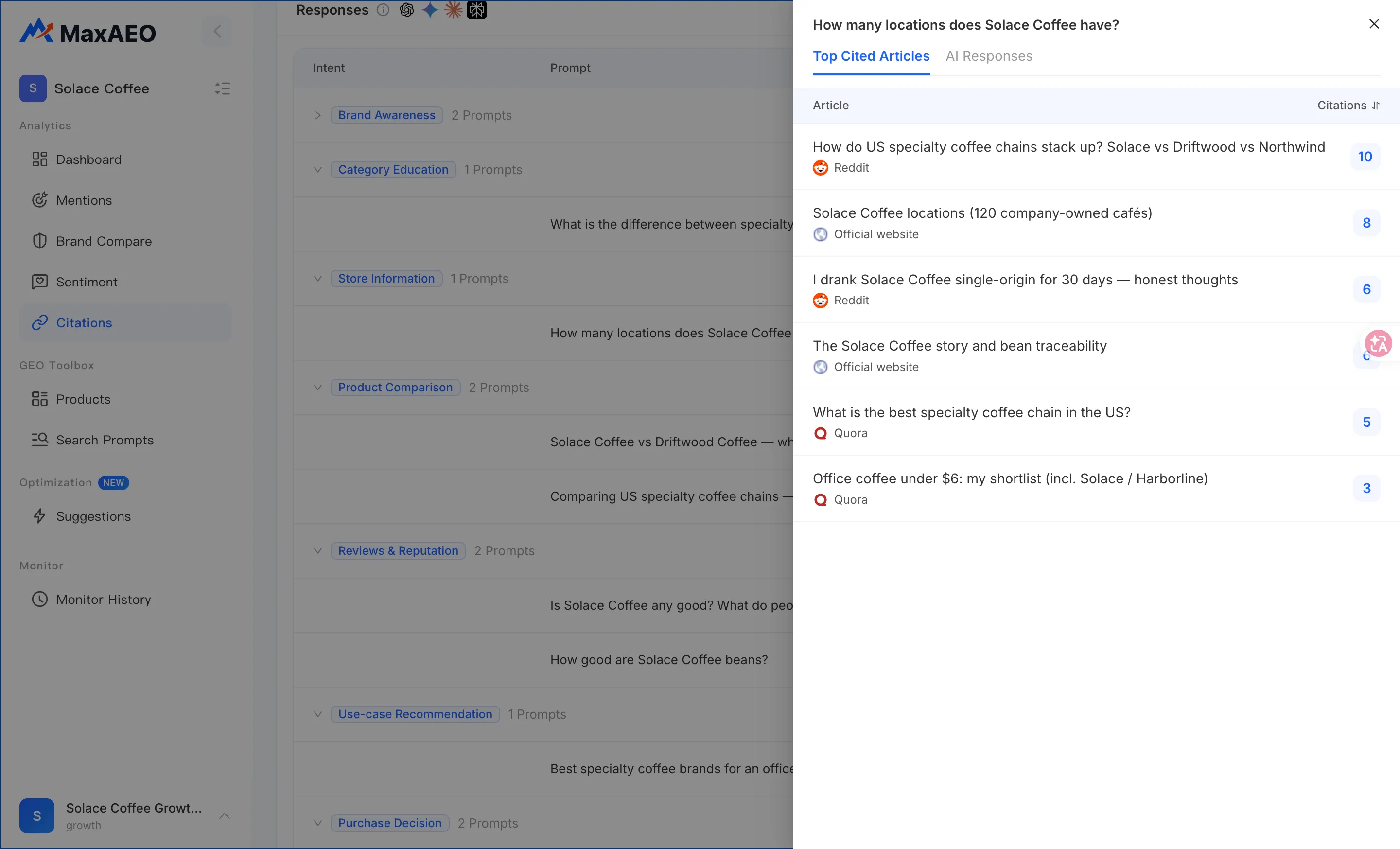
How to read it and what to do
Section titled “How to read it and what to do”Low share for your own domain = a content gap
Section titled “Low share for your own domain = a content gap”If your own website and official content are barely visible in the treemap, the AI can’t cite you when it talks about your category — your story is being told entirely by third parties. That usually points to one of two gaps: your site lacks the content formats AI loves to cite (comparison pages, listicles, guides, Q&A), or the content exists but isn’t being retrieved. Head to Optimization — it generates a prioritized action list and article drafts based on your actual gaps.
High-frequency third-party sources = pitch and partnership targets
Section titled “High-frequency third-party sources = pitch and partnership targets”The outlets that keep showing up in the treemap and in Top 3 Media are the channels the AI currently trusts most. Instead of building from zero, borrow their authority: pitch articles, get included in their reviews, or set up content partnerships so your brand appears in the places the AI already cites. See Channels for what works on each channel.
Cross-reference with Mention Rate
Section titled “Cross-reference with Mention Rate”Citations and Mention Rate are cause and effect: when a prompt shows a low Mention Rate, the reason is usually right there in its Top Cited Articles — every citation goes to competitor content or outlets that never mention you. Put the low-mention prompts from the Mentions page side by side with the source breakdown here.