
Brand Knowledge
The brand knowledge base lives in the Brand Profile tab of the Products page. It holds MaxAEO’s “official view” of your brand: what it’s called, where its website is, what it does — and every spelling the brand might appear under in AI answers (name variants and domain variants).
Why it determines monitoring accuracy
Section titled “Why it determines monitoring accuracy”The brand knowledge base plays two baseline roles in the monitoring pipeline:
- Detection baseline — it defines what counts as a mention of you. When calculating Mention Rate, the system matches each AI answer against your brand name, name variants, and domain variants; only a hit on one of them counts as a mention. Incomplete variants mean real mentions get missed, and your Mention Rate, Competitive Rank, and Avg Position are all understated.
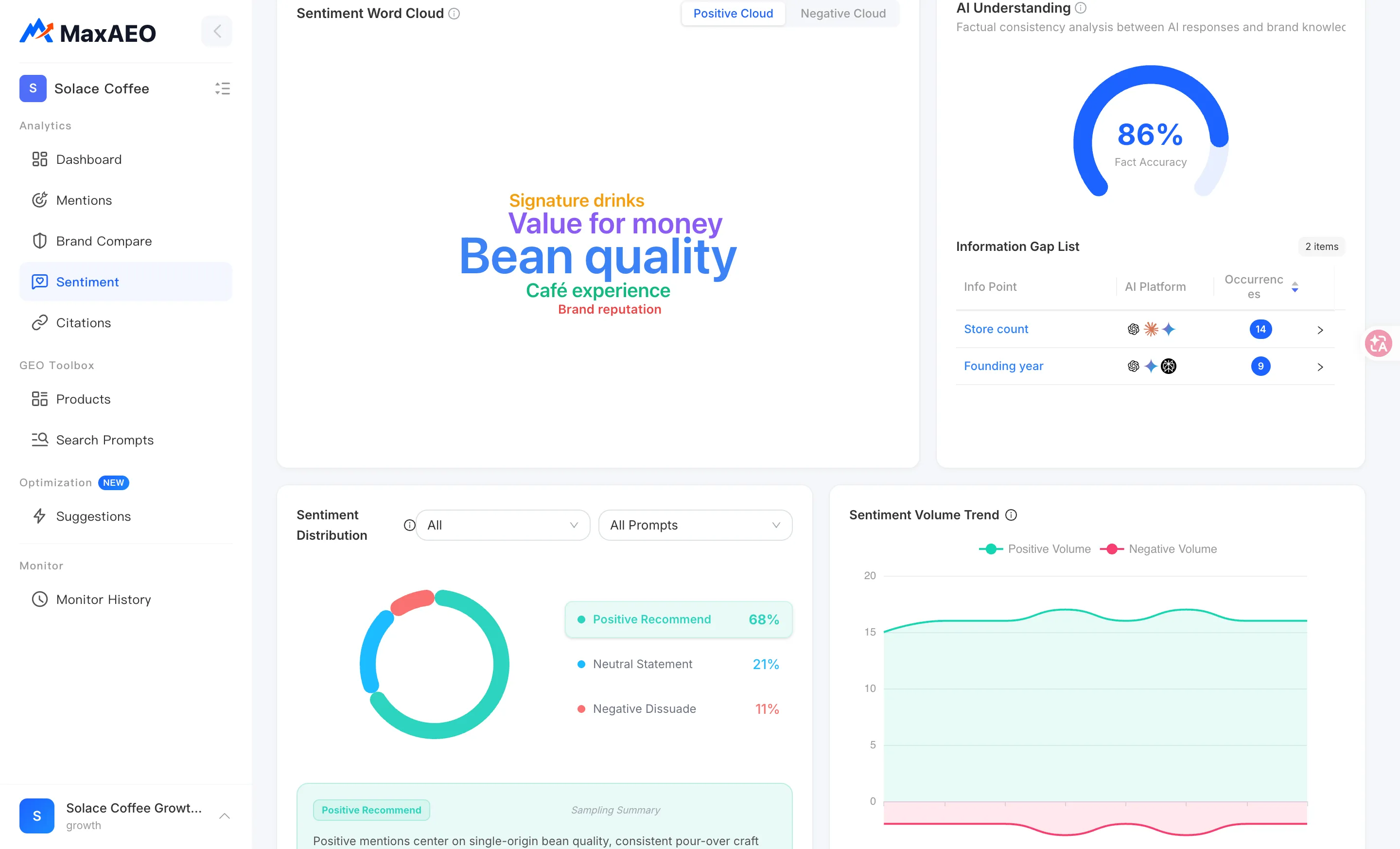
- Fact baseline — it judges whether what AI says about you is true. The AI Understanding module on the Sentiment page compares AI answers against your brand knowledge base to produce Fact Accuracy and the Information Gap List. The more complete your description, the more accurate the comparison.
In short: the credibility of your monitoring data starts with the completeness of your brand profile.
Open the Brand Profile tab
Section titled “Open the Brand Profile tab”Open Products from the sidebar — it lands on the Brand Profile tab by default. Above the tabs are four overview cards, and the first one is the Brand Profile completeness card (covered below).
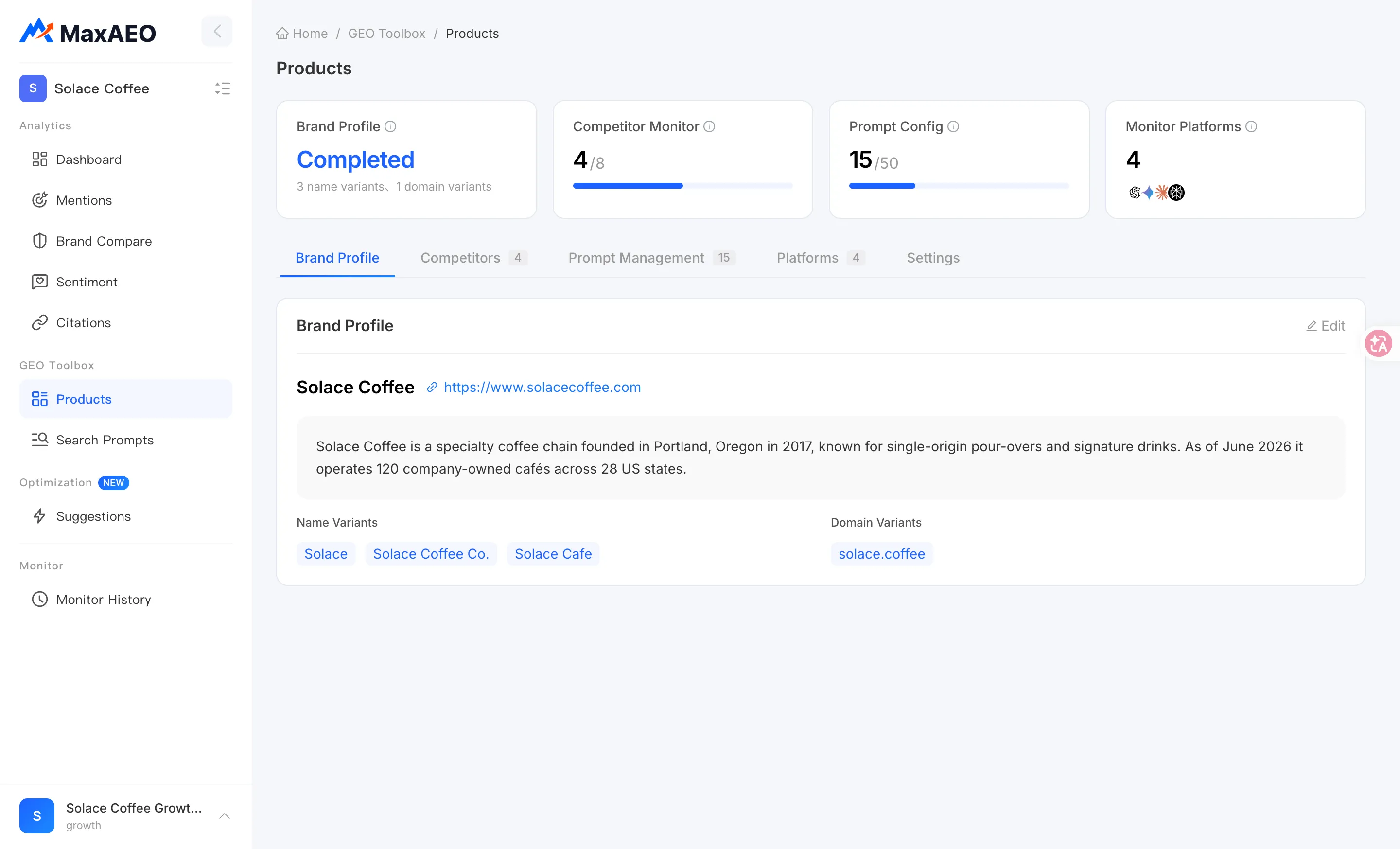
Fields explained
Section titled “Fields explained”Click Edit to enter edit mode, then Save to apply your changes (or Cancel to discard them). What each field does:
| Field | Required | Purpose |
|---|---|---|
| Brand Name | Required — cannot be empty | Your brand’s primary name, the first thing mention detection matches against |
| Official URL | Optional | Your official website, used to recognize links and citations that point to you in AI answers |
| Brand Description | Optional | What the brand does and its key selling points — the main input for fact checking (AI Understanding) |
| Name Variants | Optional | Other spellings of your brand: abbreviations, aliases, casing/spacing differences, localized names |
| Domain Variants | Optional | Domains beyond the official URL that point to you: alternate TLDs, subdomains, legacy domains |
Name variants and domain variants are added the same way: type a variant in the input and press Enter to add it. Added variants appear as tags you can remove individually.
Why variants matter: a concrete example
Section titled “Why variants matter: a concrete example”AI answers spell the same brand in many ways. Suppose 100 AI answers in a period actually mention you:
- 60 write “MaxAEO”;
- 30 write “Max AEO” (with a space);
- 10 don’t name you at all — they just link to maxaeo.ai.
If you’ve only registered the brand name “MaxAEO”, the system recognizes just the first 60, and your Mention Rate comes out at 60% of its true value. Add “Max AEO” as a name variant and “maxaeo.ai” as a domain variant, and all 100 are counted. “MaxAEO”, “Max AEO”, and “maxaeo.ai” all mean you — so all of them should be registered.
Variant types worth registering:
- Name variants: common abbreviations and aliases, spellings with or without spaces/hyphens, localized names, nicknames used in communities;
- Domain variants: alternate TLDs (e.g. maxaeo.ai and maxaeo.com), frequently used subdomains, pre-migration legacy domains.
The Brand Profile completeness card
Section titled “The Brand Profile completeness card”The Brand Profile overview card at the top of the Products page shows how complete your profile is: a Completed or Incomplete status, plus the current variant counts (e.g. “3 name variants, 2 domain variants”).
When you see “Incomplete”, fill in the brand description and variants first — it’s the lowest-cost move for improving detection accuracy.
The loop with Sentiment: from information gaps to “Add now”
Section titled “The loop with Sentiment: from information gaps to “Add now””The brand knowledge base isn’t a form you fill in once and forget. Together with the AI Understanding module on the Sentiment page, it forms a continuous correction loop: factual errors AI makes about you (wrong pricing, misremembered features) get detected there, and the place to fix them is the brand knowledge base.
-
On the Sentiment page, open the Information Gap List in the AI Understanding module. Each item shows the info point, the AI’s statement vs. the real info, how often it occurred, and which platforms are involved.
-
If an item’s “Real Info” column is empty (showing “No real info yet”), the knowledge base has no fact to compare against — click Add now to jump to the brand knowledge base.
-
Add the correct information to the brand description (or other profile fields) and save. For example, if AI keeps saying you “don’t support” a feature you actually do, state that feature explicitly in your description.
-
The added information takes effect in the next monitoring cycle and becomes the baseline for future fact checks. Over the following runs, watch whether Fact Accuracy recovers and the gap disappears.
Maintenance tips
Section titled “Maintenance tips”- Fill it in properly at creation time: the first step of Stage 3 in the New Project Wizard is Brand Knowledge, pre-filled with an AI-drafted description and variant suggestions. Two minutes of review there saves a lot of “why are my mentions being missed” confusion later;
- Update it as your product evolves: after a rename, domain migration, new feature, or pricing change, sync the description and variants promptly;
- Let information gaps drive you: check AI Understanding periodically and fill in whatever gap it surfaces, so the knowledge base always matches reality.