
Competitive Rank
Competitive Rank answers one question: among the brands you’re monitoring, who does AI lean toward recommending? Mention Rate tells you how often AI mentions you; Competitive Rank tells you where that frequency puts you relative to your rivals.
What is Competitive Rank
Section titled “What is Competitive Rank”Competitive Rank is your brand’s Mention Rate ranking among all monitored brands — you plus every competitor you’ve configured. The higher you rank, the more AI favors recommending you.
The math is straightforward: MaxAEO sorts all monitored brands in your project by Mention Rate, highest first, and your position in that list is your Competitive Rank. The Dashboard KPI card shows it alongside the field size — for example “#2 of 6 brands competing” means you rank second out of six monitored brands.
Why you must read it alongside Mention Rate
Section titled “Why you must read it alongside Mention Rate”Either metric on its own can mislead you; together they tell the full story. Two concrete examples:
Example 1: decent mention rate, poor rank. Say you monitor the smartwatch category and your Mention Rate is 40% — 40 out of 100 AI responses mention you. Sounds fine. But your three monitored competitors sit at 75%, 68%, and 62% — all above 60%. Your Competitive Rank is #4 of 4 brands — dead last. Mention Rate alone says “not bad”; adding rank reveals the real picture: in this category, AI responses almost always mention your competitors, mention you less than half the time, and when users see a recommendation list, you’re likely below everyone else.
Example 2: low mention rate, but ranked #1. Now flip it. You’re in a brand-new niche (say, an emerging developer tool category) with a Mention Rate of just 15%, while competitors sit at 8%, 5%, and 3%. Your Competitive Rank is #1 of 4 brands. This tells you the whole category barely registers in AI responses yet — AI rarely recommends anyone in this space — but whenever it does, you’re the name it reaches for first. The right play here isn’t fighting competitors; it’s growing category visibility so AI brings the category up more often. You’d be the biggest beneficiary.
The one-line summary: Mention Rate measures absolute visibility; Competitive Rank measures relative position. High visibility doesn’t guarantee a good position (Example 1), and low visibility doesn’t mean a bad one (Example 2). Read rank first to judge the competitive landscape, then Mention Rate to judge absolute level and headroom.
Where to find it
Section titled “Where to find it”Competitive Rank data lives in two places:
-
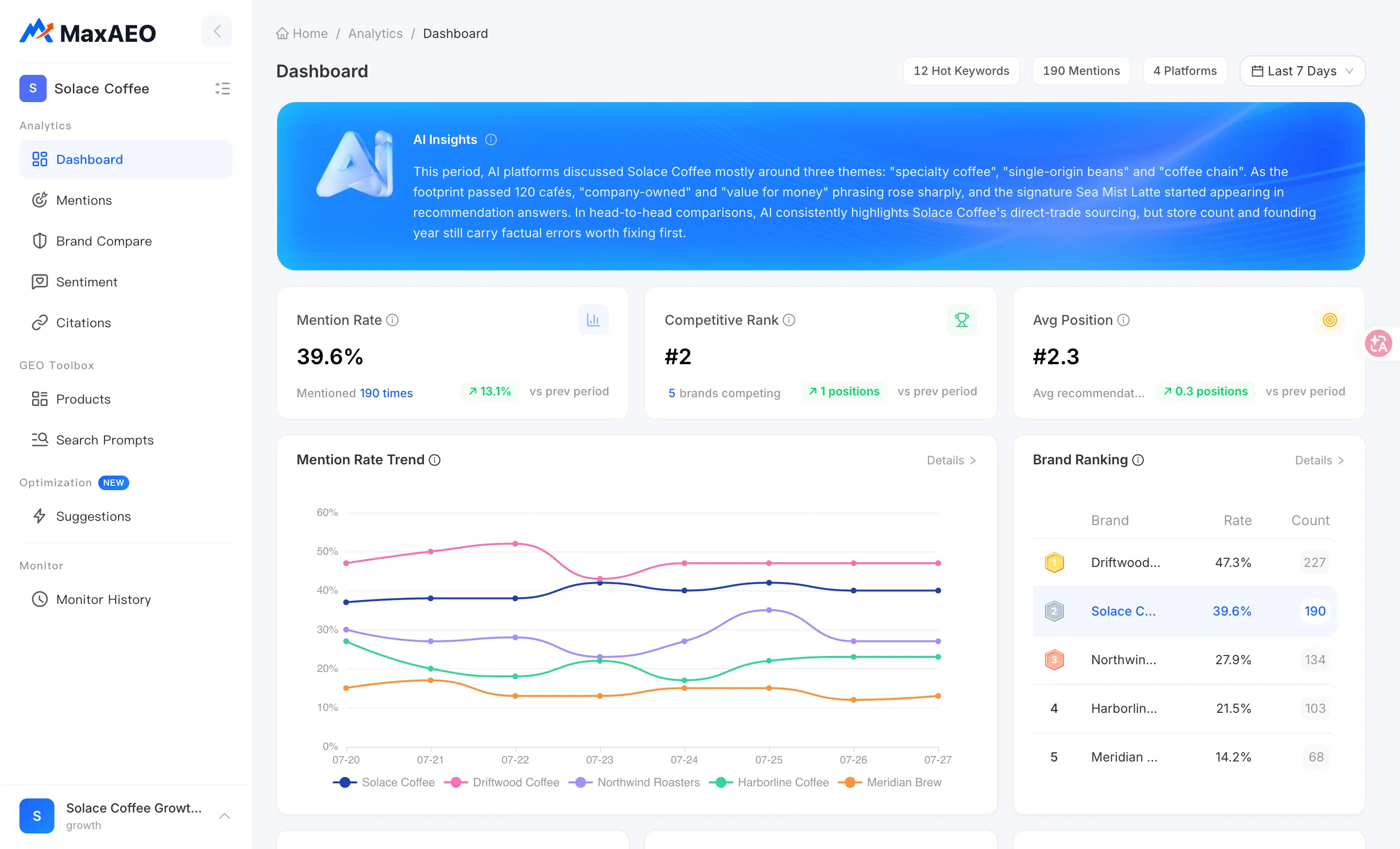
Dashboard → Competitive Rank KPI card
Shows your current rank, the field size (“N brands competing”), and the change vs prev period (how many positions you moved). This is your first stop for daily check-ins.
-
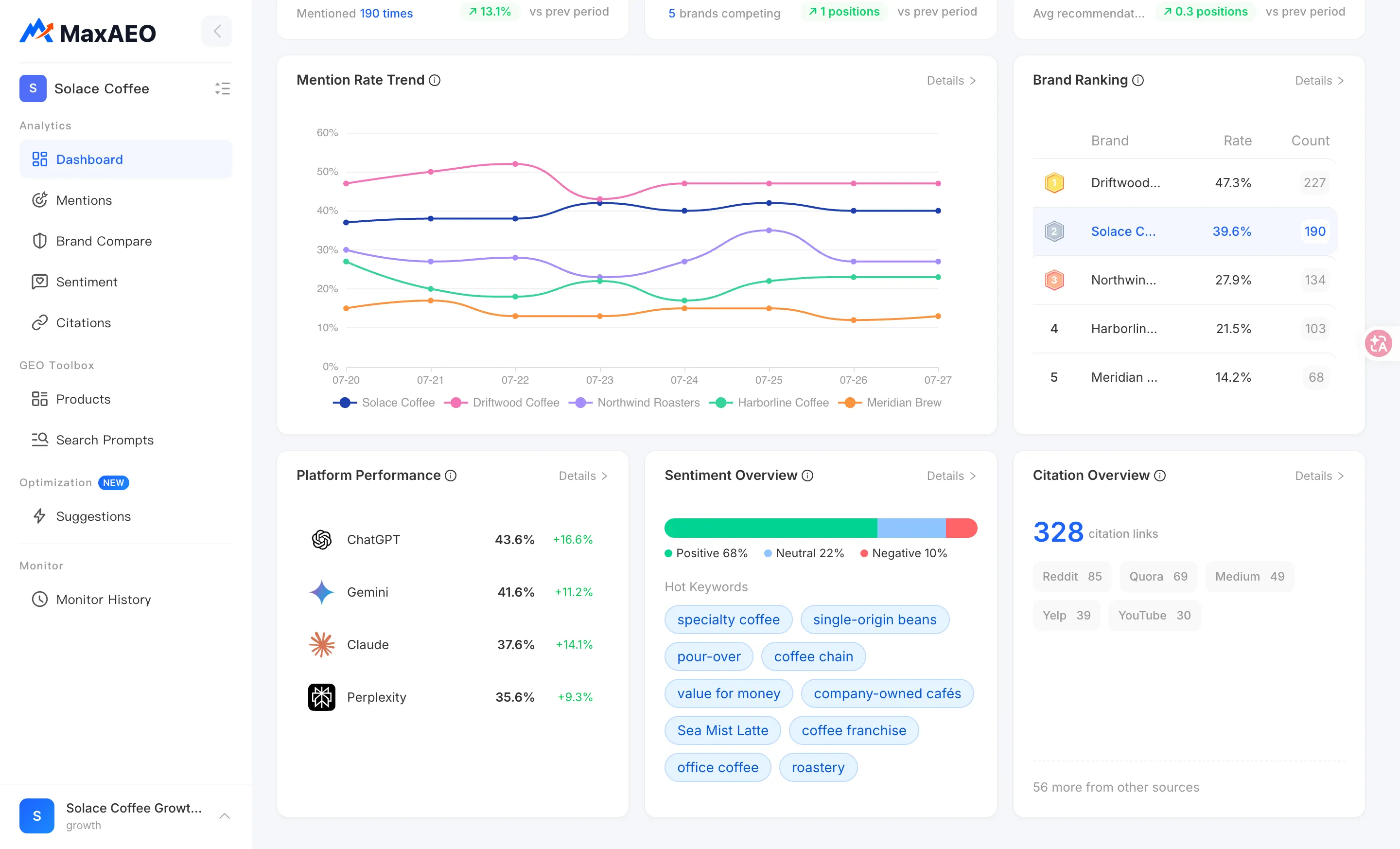
Dashboard → Brand Ranking table
All monitored brands sorted by Mention Rate, highest first, with your brand highlighted (marked “Self”). Each row shows the brand’s rate and mention count. This table is the raw evidence behind your rank: who’s ahead of you and by how much.
-
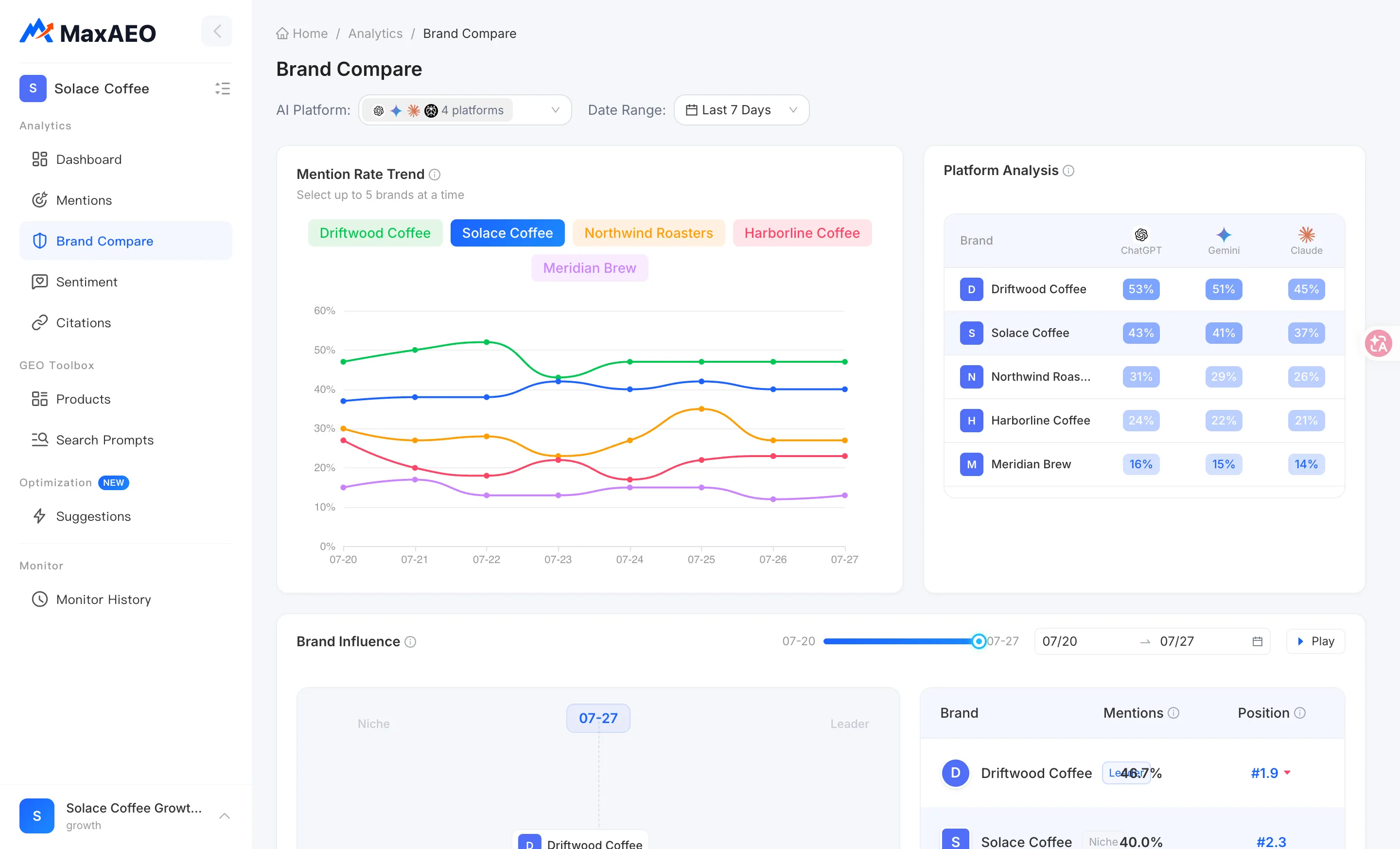
Brand Compare page
Come here when you need to dig into why a rank moved. Select brands to compare (up to 5 at a time) and use:
- Mention Rate Trend — multi-brand mention rates over time, so you can spot who’s rising and who’s slipping at a glance;
- Platform Analysis heatmap — a brand × AI platform matrix where darker cells mean higher mention rates, useful for pinpointing which platform (ChatGPT, Gemini, Claude, Perplexity) you trail on;
- Brand Influence bubble chart — Mention Rate on the X-axis, rank (AI recommendation position) on the Y-axis, split into four quadrants (Leader / Niche / Low Performance / Low-converting), with play/pause animation to watch the landscape shift over time.
At the top of the Dashboard you can switch projects, multi-select AI platforms, and adjust the date range (last 7/14/30 days or custom). Competitive Rank recalculates with your filters — your rank on a single platform can differ from your all-platform rank, and that’s expected.
How to interpret and act
Section titled “How to interpret and act”Rank dropped? First find out who climbed
Section titled “Rank dropped? First find out who climbed”Rank is relative — a drop doesn’t necessarily mean you got worse; it may mean a competitor got stronger. Diagnose in this order:
- In the Dashboard Brand Ranking table, compare this period against the previous one and identify which brand newly moved above you.
- Open Brand Compare, select your brand and that competitor, and check the Mention Rate Trend: is their rate climbing, is yours falling, or both?
- Use the Platform Analysis heatmap to locate which AI platform the change happened on — a single-platform swing calls for a very different response than an across-the-board decline.
- If your own Mention Rate is the one falling, go to the Mention Rate page and audit prompt by prompt to find which questions stopped mentioning you.
Your competitor list determines how much the rank means
Section titled “Your competitor list determines how much the rank means”Competitive Rank’s frame of reference is your competitor list — its quality decides whether the number means anything:
- Too few competitors, or only weak ones: your rank inflates. Monitoring two also-rans and ranking “#1 of 3 brands” doesn’t prove AI actually favors you.
- Missing the real market leader: you’re blind to your biggest threat — the brand AI recommends every day isn’t even in your ranking table.
- Incomplete competitor name variants: AI may refer to a competitor by an abbreviation, alias, or alternate spelling. Missing variants cause undercounting, deflating the competitor’s mention rate and inflating your rank.
Review your competitor list on a regular cadence — quarterly, or whenever a new player enters your category. You add, remove, and maintain name variants for competitors in the Products page under the Competitors tab; see the competitor setup section of the New Project Wizard guide for how to configure them. Note that the number of competitors is capped by your plan quota, and any change takes effect in the next monitoring cycle — historical data is never rewritten.