Cloudflare blocking AI crawlers is now the default, not the exception — and the worst cases never show up in your analytics. When a bot-management rule, a rate limit, or a cookie-consent wall turns away GPTBot or OAI-SearchBot, the request usually dies at Cloudflare’s edge before your origin server ever logs it. Your dashboards stay green while your brand quietly drops out of ChatGPT, Perplexity, and Copilot answers. This guide shows how to reproduce that silent failure with real fetches, prove it, and fix the specific settings behind it — with the exact user-agent strings, status codes, and commands you need.
Most published advice on this topic is either a news recap of Cloudflare’s policy change or a generic "how to fix a 403" article written for humans hitting a browser challenge. Neither answers the only question a marketer cares about: is an answer engine being served something no buyer ever sees, and how do I prove it? That is the gap this piece fills.
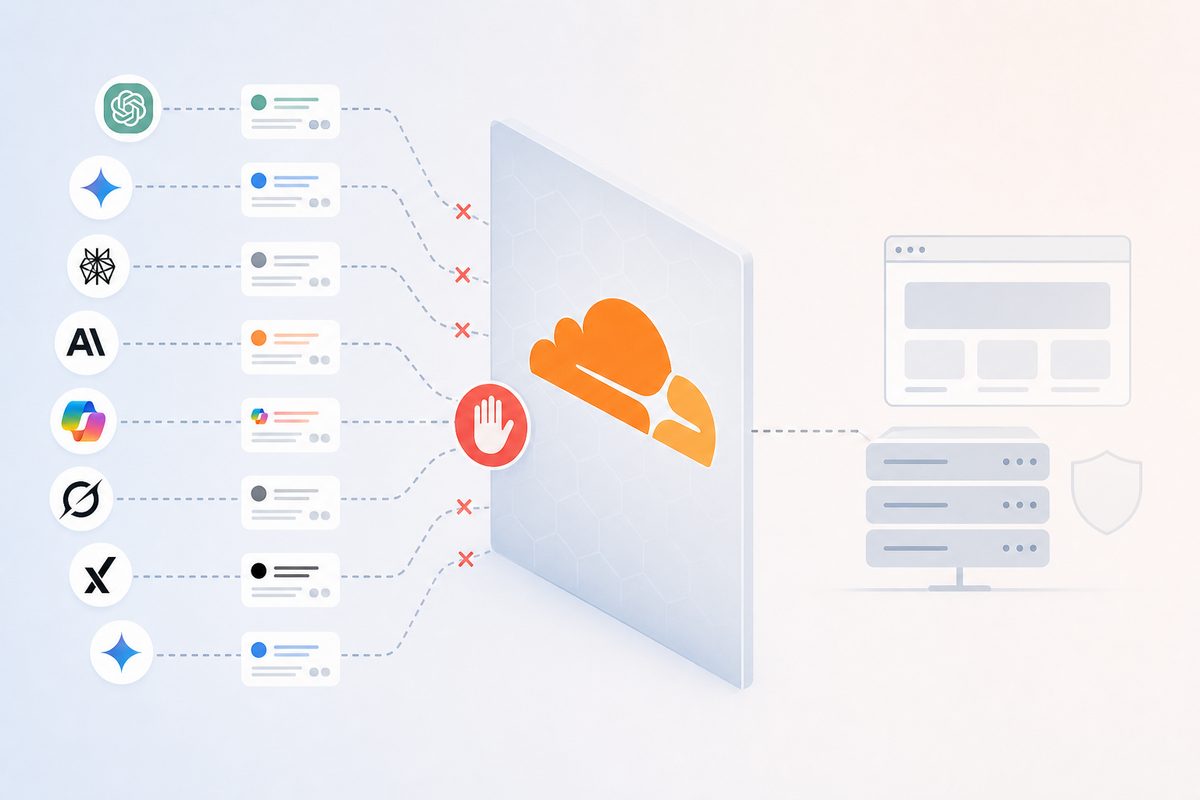
What does "Cloudflare blocking AI crawlers" actually mean?
Cloudflare blocking AI crawlers means a request from an AI bot is stopped at Cloudflare’s network edge — by a bot rule, WAF rule, rate limit, or challenge — before it reaches your website. The AI company gets an error page or a challenge instead of your content, so your page never enters that model’s index or live-answer pipeline.
This matters because AI answers are built from what the crawler actually retrieved. If the fetch fails, there is nothing to embed, chunk, or cite — the retrieval step simply has no document to work with. A block is therefore not a minor technical hiccup; it is the difference between being a source and being invisible.
The trap is that "blocked" wears three different disguises, and only one of them looks like an error.
Why this is a silent failure your logs never show
The block happens on Cloudflare’s servers, not yours, so your origin access logs are empty — from your side it looks like the AI crawler simply never visited. There is no 403 in your Apache or Nginx logs, no error in your APM tool, no alert. The traffic never arrived.
That is the first blind spot. The second is worse: the consent-wall and geo-redirect classes return HTTP 200. Your uptime monitor sees "success," your error-rate dashboards see nothing wrong, yet the crawler received a cookie interstitial or an empty JavaScript shell instead of your content. No standard monitoring tool flags a 200 that contains the wrong body.
Put together, these two facts explain why almost nobody audits this: the tooling that would normally catch it is looking in the wrong place. You cannot find an edge block in an origin log, and you cannot find a "successful failure" by watching status codes. You have to go look from the outside, as the bot.
The three failure classes — and the status codes that reveal them
There are exactly three ways Cloudflare (or any WAF) starves an answer engine: hard blocks, throttling, and successful-but-empty responses. Learn to tell them apart and you can diagnose any case in minutes.
| What the bot receives | Status | Likely Cloudflare / WAF cause | Where to look |
|---|---|---|---|
| Blocked outright | 403 | "Block AI bots" managed rule, Super Bot Fight Mode, a WAF custom rule, or a low bot score | Security → Events, Bot Analytics |
| Interactive challenge it can’t solve | 403 / 503 + JS challenge | Managed Challenge or JS Challenge (a crawler can’t run the JavaScript) | Security → Events, action managed_challenge |
| Throttled after N requests | 429 | Rate-limiting rule or per-IP crawl budget | WAF → Rate limiting rules |
| "Success," but empty or wrong content | 200 | Cookie-consent interstitial, client-side rendering, or a geo redirect | The response body, not the status code |
The first three are honest failures — annoying but findable. The fourth is the one nobody audits, because every dashboard you own reports it as healthy. When you diagnose this problem, never trust the status code alone; always inspect the body the bot received.
The AI crawlers you’re probably blocking (and what each block costs)
Every AI crawler does one of three jobs — training a model, indexing for search, or fetching a page because a user asked — and the job, not the brand name, decides what you lose by blocking it. Blocking a training bot keeps you out of a model’s weights; blocking a search or user-triggered bot removes you from live citations today.
| User agent | Operator | Job | Blocking it costs you |
|---|---|---|---|
| GPTBot | OpenAI | Model training | Inclusion in future training data |
| OAI-SearchBot | OpenAI | ChatGPT search index | ChatGPT search citations |
| ChatGPT-User | OpenAI | User-triggered fetch | Live "browse this link" answers |
| ClaudeBot | Anthropic | Model training | Training inclusion |
| Claude-User / Claude-SearchBot | Anthropic | User fetch / search | Claude citations |
| PerplexityBot | Perplexity | Search index | Perplexity citations |
| Google-Extended | Gemini/Vertex training opt-out | Google AI training only | |
| Applebot-Extended | Apple | Training opt-out | Apple Intelligence training |
Exact strings come from each vendor’s documentation — OpenAI, for instance, publishes both its user-agent strings and its IP-range files (gptbot.json and searchbot.json at openai.com), so you can match on published IPs rather than the spoofable UA string.
If you’re already missing from ChatGPT and can’t explain why, a silent SearchBot block is a prime suspect — it’s one of the first things to rule out in why your brand is invisible on ChatGPT.
One nuance that trips up most teams: Google’s AI Overviews and AI Mode are served from the regular Googlebot index, not from Google-Extended. Blocking Google-Extended opts you out of Gemini training but does not remove you from AI Overviews. Blocking Googlebot, on the other hand, removes you from both classic search and AI Overviews at once — so the crawler you least want to block is the one people most often lump in with "AI bots."
How to reproduce the block: fetch as the bot
To reproduce a block, request the exact URL twice — once as a browser, once as the AI crawler — and diff what comes back. This is the single most useful test in this article, and almost no one runs it.
Run these from a US-based cloud VM, not your laptop. AI crawlers operate almost entirely from US data-center IP ranges, so a residential connection won’t reproduce IP- or ASN-based rules, and it may pass a geo-block that the real bot fails.
# 1) Baseline — fetch as a normal browser
curl -sSL -A "Mozilla/5.0 (Macintosh; Intel Mac OS X 10_15_7) AppleWebKit/537.36 \
(KHTML, like Gecko) Chrome/131.0.0.0 Safari/537.36" \
  -o human.html -w "HUMAN: %{http_code}\n" https://example.com/target-page

# 2) Fetch as GPTBot (training)
curl -sSL -A "Mozilla/5.0 AppleWebKit/537.36 (KHTML, like Gecko); compatible; \
GPTBot/1.4; +https://openai.com/gptbot" \
  -o gptbot.html -w "GPTBot: %{http_code}\n" https://example.com/target-page

# 3) Fetch as OAI-SearchBot (the bot that feeds ChatGPT citations)
curl -sSL -A "Mozilla/5.0 (compatible; OAI-SearchBot/1.4; +https://openai.com/searchbot)" \
  -o searchbot.html -w "SearchBot: %{http_code}\n" https://example.com/target-page

# 4) Compare what each one actually received
diff human.html gptbot.html
grep -c "the-headline-only-humans-see" searchbot.html   # 0 = your content is missing
Read the results this way:
- Different status codes (200 for human, 403/429 for the bot) → a bot rule, rate limit, or challenge. Go to Security → Events.
- Same 200, different body → the silent class. The bot got a consent wall, a JS shell, or a geo variant. This is the one your monitoring hid.
- A
cf-mitigatedheader or a Cloudflare challenge page in the bot’s body → Cloudflare is intercepting before origin.
Two honest caveats. First, curl tests only user-agent rules; it can’t reproduce a rule that verifies the bot’s IP, because you aren’t on OpenAI’s network. Second, curl doesn’t run JavaScript — which is a feature here, because neither do the AI crawlers, so what curl sees is close to what they see.
Prove it’s real: verify the bot, don’t trust the header
A user-agent string is just text anyone can type, so proving a block — or an impostor — means checking the request’s origin, not its label. This cuts both ways, and both directions bite marketers.
The legitimate way to confirm a real crawler is:
- Reverse-DNS the source IP, then forward-resolve the hostname back to confirm it belongs to the operator (the classic Googlebot verification method).
- Check the IP against the vendor’s published range file — OpenAI’s
gptbot.json, and Anthropic’s published IP allowlist. If the IP isn’t on the list, the "GPTBot" hitting you is fake. - Check the ASN. Genuine AI crawlers come from the operator’s or a major cloud’s autonomous system, not a residential ISP.
Now the cautionary tale that makes this section non-optional. In August 2025, Cloudflare reported that Perplexity used undeclared "stealth" crawlers — switching to a generic Chrome user-agent to reach content on sites that had blocked its declared bot, at an estimated 3–6 million requests per day across tens of thousands of domains. Cloudflare removed Perplexity from its verified-bot program in response.
The lesson isn’t "Perplexity bad." It’s that user-agent identity is unreliable in both directions: you can block a bot that then returns wearing a disguise, and you can "allow" a bot while an impostor scrapes you. This is exactly why the industry is moving toward cryptographic verification — Web Bot Auth, a signed-agents approach built on HTTP Message Signatures (RFC 9421), lets a bot prove its identity with a signature instead of an IP list. Until that’s universal, verify by origin.
Consent interstitials and cookie walls: the 200 that isn’t
A cookie-consent interstitial that hides content until a visitor clicks "Accept" serves AI crawlers a page with no content — because the crawler never clicks, and usually never runs the JavaScript that would reveal it. The response is a healthy 200, so nothing alerts you.
Here is the compounding factor. A Vercel analysis of how AI crawlers behave across hundreds of millions of fetches found that GPTBot and its peers do not execute JavaScript — they read the raw initial HTML and stop. So any of these patterns will quietly starve them:
- A JS-injected consent modal that overlays or replaces content until a click.
- Client-side rendering where the real content is fetched by JavaScript after load.
- A geo interstitial ("Confirm your region") gating the page.
- A cookie wall that returns a stub until consent is stored.
There’s a compliance angle too: under the European Data Protection Board’s guidance, cookie walls that condition access on consent aren’t valid consent in most of the EU anyway — and Google’s own guidance is that content should be reachable by crawlers regardless of consent state. So the fix aligns with both goals: render your primary content server-side, and make the consent banner a non-blocking overlay that never gates the HTML.
This is also why live-fetching AI browsers see a different site than your buyers do — a dynamic we cover in how AI browsers read your site live.
robots.txt vs the WAF: two different layers
robots.txt is a polite request; Cloudflare’s bot rules and WAF are enforcement — and enforcement wins. A well-behaved crawler reads robots.txt and chooses to obey it, but the file blocks nothing on its own. A Cloudflare rule stops the fetch at the edge whether robots.txt says allow or deny.
The practical consequence: allowing a crawler in robots.txt does nothing if a WAF or bot rule turns it away at the edge. Both layers have to agree. Teams routinely "unblock" a bot in robots.txt, watch nothing change, and conclude the crawler is broken — when the real block is a Cloudflare rule they never checked.
The Cloudflare settings that cause this
Five Cloudflare features produce almost every AI-crawler block, and each has a specific place to check and change it. You don’t need to disable your security posture — you need to make deliberate exceptions.
- Block AI bots (managed rule). An auto-updating one-click rule that blocks GPTBot, ClaudeBot, and peers. Since July 2025, Cloudflare has defaulted new domains to blocking AI crawlers — so a site created after that date may be blocking without anyone having chosen to. Check: Overview → AI Crawl Control (formerly AI Audit).
- Super Bot Fight Mode. Aggressive by default; "definitely automated" traffic can be challenged or blocked, and declared AI bots often score as automated. Check: Security → Bots. (Cloudflare’s own Bot Fight Mode docs recommend running in challenge, not block, while you tune.)
- Managed Challenge. A JavaScript challenge a crawler cannot solve — it looks like a block from the bot’s side.
- Rate-limiting rules. A crawler hitting many URLs quickly can trip a rate-limiting rule and start receiving 429s mid-crawl, so it indexes some pages and abandons others.
- WAF custom rules / Pay Per Crawl. A custom rule targeting a user-agent or ASN, or Cloudflare’s Pay Per Crawl monetization layer, can return a 402/403 to bots that don’t pay.
The point is not that Cloudflare is wrong to offer these — many publishers want to block or bill AI training. The point is that the default and the granularity rarely match your actual intent, which is usually "block training if I must, but let the citation-driving search bots in."
A fix-it checklist that keeps security and citations
Allow the crawlers that generate citations, keep whatever training policy you want, and verify everything — in that order. Work through this list top to bottom:
- Decide per-job, not per-brand. Allow search and user-triggered bots (OAI-SearchBot, ChatGPT-User, PerplexityBot, Claude-SearchBot); block training bots (GPTBot, ClaudeBot) only if you have a real reason.
- Turn off the blanket "Block AI bots" rule and replace it with explicit allow rules for the citation bots you want. Newer Cloudflare defaults already move toward "allow search, restrict training" — confirm yours matches.
- Exempt those user agents from Super Bot Fight Mode and Managed Challenge, since a crawler can’t pass a JS challenge.
- Raise or scope rate limits for verified AI crawler IP ranges so a legitimate crawl doesn’t hit 429s.
- Move your consent banner off the critical path — server-render content, keep the banner as a non-blocking overlay.
- Verify by IP/ASN, not user-agent, so your allowlist can’t be abused by impostors.
- Re-run the fetch-as-bot test from the earlier section to confirm the fix. A green diff is your proof.
For the broader accessibility work this connects to — status codes, render paths, and structured content — see AI crawler optimization. And if you’re weighing whether an llms.txt file earns you anything, treat it as a supplement, never a substitute for actually letting the crawler fetch your real pages.
How to monitor so it doesn’t happen again
Because edge blocks never touch your logs, the only reliable monitoring is external: scheduled fetch-as-bot checks plus tracking whether your brand still appears in AI answers. One tells you the door is open; the other tells you it’s actually driving citations.
Set up two things. First, a recurring synthetic fetch — the curl-as-bot diff on your key pages, run on a schedule from a US IP, alerting on any status change or body diff. Second, an AI visibility layer that watches how ChatGPT, Gemini, Perplexity, Claude, Copilot, and Google’s AI Mode mention and cite your brand over time. A sudden drop in AI share of voice with no content change is a classic fingerprint of a new WAF or bot rule.
That correlation is the whole game: pairing an access change with an answer-visibility change is how you attribute cause. We go deep on that method in proving which change actually won (or lost) the citation. This is precisely what an AI search monitoring platform like MaxAEO is built to catch — it tracks brand mentions in ChatGPT and other engines daily, so a block that silently removes you from AI-generated shortlists surfaces as a measurable, dated drop rather than a mystery.
Frequently asked questions
Does Cloudflare block AI crawlers by default?
Yes — for domains onboarded after July 2025, Cloudflare defaults to blocking AI crawlers. It has since refined the default toward "allow search, restrict training and agent use" for some page types, but the practical takeaway stands: a site set up recently may be blocking AI bots without anyone having chosen to. Always verify in AI Crawl Control rather than assuming.
Will blocking GPTBot remove my brand from ChatGPT?
Blocking GPTBot removes you from OpenAI’s future training data, not from live ChatGPT search results. The bots that feed ChatGPT citations are OAI-SearchBot (the search index) and ChatGPT-User (user-triggered fetches). If your goal is to appear in ChatGPT answers today, those two must be allowed even if you block GPTBot.
How do I know if Cloudflare is blocking AI crawlers on my site?
Fetch your page with an AI crawler’s user-agent from a US server and compare it to a normal browser fetch. A different status code (403/429) or a different response body (empty, consent wall, JS shell) confirms a block. Cross-check with Cloudflare’s Security → Events and, externally, with an AI visibility tool that shows whether your citations dropped.
Do AI crawlers render JavaScript?
No — as of 2026, the major AI crawlers (GPTBot, OAI-SearchBot, ClaudeBot, PerplexityBot, and others) read the initial HTML and do not execute JavaScript. So any content that appears only after a script runs — client-side rendering, JS consent modals, lazy-injected copy — is effectively invisible to them, even when the page returns a 200.
How long until my content reappears in AI answers after I unblock the crawler?
Search and user-triggered bots recrawl fast; training data does not. Once the fetch succeeds, OAI-SearchBot, ChatGPT-User, and PerplexityBot typically re-index within days to a few weeks, so live citations can return relatively quickly. Training bots (GPTBot, ClaudeBot) only affect the next model version, which can be months out — another reason to prioritize allowing the search and fetch bots first.
Is it safe to unblock AI crawlers?
Yes, if you allow selectively and verify by origin. You can permit the search and user-triggered bots that generate citations while still blocking training crawlers, and you can scope every allow rule to the vendor’s published IP ranges so a spoofed user-agent can’t exploit it. The risk isn’t opening the door — it’s leaving it open to impostors.