AI browser visibility is whether an agentic browser — ChatGPT Atlas, Perplexity Comet, Copilot Mode in Edge — fetches your page inside a real user session, parses it correctly, and repeats your claims back to the buyer. It is decided at fetch time, in a tab, seconds before the answer renders. No index is consulted. No crawl budget is spent.
That one mechanical difference breaks most of what marketing teams learned about AI retrieval in 2024 and 2025. The rules you memorised for GPTBot describe an asynchronous crawler that builds a corpus. An agentic browser is a person's browser, running as that person, hitting your origin the way a customer would.
Over 12 weeks we ran the same 320 buyer-intent prompts three ways — in chat, in Atlas, in Comet — and collected 2,880 answers. The brand lists did not match. Below is what changed, why, and the four checks that predicted most of the gap.
What is AI browser visibility?
AI browser visibility is a brand's presence in answers generated by an AI browser that reads live pages during a user's session, rather than from a pre-built index. It depends on session-time page access, machine-readable structure, and quotable on-page claims — not on crawl permissions or historical rankings alone.
The distinction matters because the failure mode is silent. A page can rank fine, be indexed by every AI search bot, and still produce nothing usable when an agent opens it in a tab with a consent modal on top. You will not see an error. You will see a competitor named instead.
Quick orientation on the terms, because they get used interchangeably and they are not the same thing:
| Term | Surface | Retrieval | Where you win it |
|---|---|---|---|
| AI browser visibility | Atlas, Comet, Copilot Mode, Gemini in Chrome | Live fetch during a user session | Origin access + page structure |
| AI search visibility | ChatGPT search, Perplexity, Google AI Mode | Pre-built index + retrieval | Crawler permissions + corpus presence |
| AI Overview visibility | Google SERP block | Google's index, query fan-out | Classic ranking + passage extraction |
| Training-data presence | The model's weights | Historical crawl | Long-run brand mentions, not fixable this quarter |
The four move together at the edges, but only one of them is decided in a tab while the buyer is watching.
Which browsers count as AI browsers in 2026
Six surfaces matter for most B2B categories. They split into two groups, and the split predicts what you have to fix.
- Agentic browsers (they navigate for the user). ChatGPT Atlas, Perplexity Comet, and The Browser Company's Dia. All Chromium builds. They open tabs, click, scroll and fill forms on the user's behalf. Your origin sees a session, not a crawl.
- Assistant sidebars (they read what is already open). Copilot Mode in Microsoft Edge, Gemini in Chrome, and Arc/Dia-style summarise-this-page features. They mostly work on the rendered content of the current tab, with index-grounded answers layered on top.
Why the split matters: agentic browsers punish access failures — a blocked fetch means you are never in the answer. Assistant sidebars punish structure failures — the page loaded fine, but the assistant could not tell what your pricing table said. Different gates, different owners on your team.
Why the crawler rules you learned for GPTBot do not apply in-browser
OpenAI runs separate bots for separate jobs, and only one of them is relevant to what an AI browser does live. According to OpenAI's crawler documentation, GPTBot collects training data, OAI-SearchBot builds the index behind ChatGPT search, and ChatGPT-User handles user-initiated fetches.
The critical line is on ChatGPT-User: OpenAI states that robots.txt rules may not apply because the action is user-triggered. Your robots.txt is a lever over the corpus and the index. It is not a lever over the session.
Agentic browsers go one step further. Atlas, Comet and Dia are all Chromium builds, so a request from a browsing agent looks structurally like a request from Chrome. Cloudflare's response is Web Bot Auth and signed agents, which cryptographically separates agents directed by end users from crawlers doing repetitive work on an operator's behalf. That standard exists precisely because the old signals — user agent string, IP range, robots.txt — no longer tell you who is on the other end.
Practical consequence: three different access-control surfaces now decide whether an AI system can read you, and they are independent.
| Surface | Controlled by | What blocking it costs you |
|---|---|---|
| Training corpus | robots.txt → GPTBot |
Nothing in citations; affects model priors |
| Search index | robots.txt → OAI-SearchBot, PerplexityBot |
Removes you from in-chat citation candidates |
| Live session fetch | WAF rules, bot management, consent walls, login gates | Removes you from in-browser answers entirely |
Most teams have tuned the first two and never audited the third. That is where AI browser visibility is actually won or lost.
How an AI browser actually reads your page
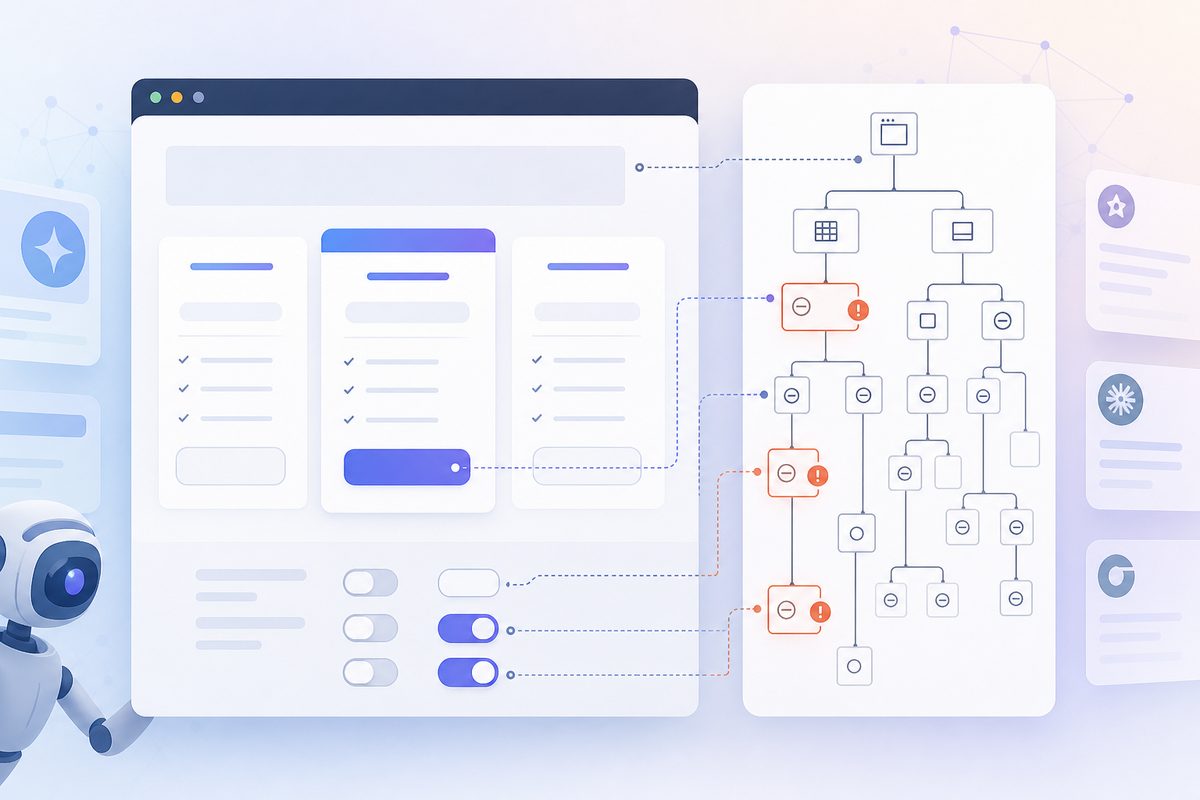
An AI browser does not look at your page. It queries the accessibility tree — the semantic model the browser builds from the DOM, containing roles, accessible names, headings, landmarks and form fields. It is the same structure screen readers have consumed for two decades, and it is far cheaper to process than pixels: a pricing page that costs thousands of image tokens as a screenshot is a few hundred nodes as a tree.
OpenAI has said Atlas uses ARIA roles and labels to interpret layout and interactive elements. That is the first time an AI vendor has named an accessibility standard as a retrieval input.
The web is going the wrong way on this. The WebAIM Million report found 95.9% of the top one million home pages had detectable WCAG 2 failures, up from 94.8% the year before — the first regression in six years. Average errors per home page rose 10.1% to 56.1.
The specific failures matter more than the headline:
- Missing image alt text — 53.1% of home pages. Your product screenshot is invisible to the agent.
- Missing form input labels — 51%. The agent cannot complete a demo request or a filter.
- Empty links — 46.3%. A link with no accessible name is a dead node in the tree.
- Empty buttons — 30.6%. Your "Compare plans" toggle is unreachable.
Search Engine Journal's analysis of this trend pairs it with Cloudflare Radar data showing automated traffic overtaking human traffic on HTML content — a crossover forecasters had put a year further out. More machines are reading, and the pages are getting harder to read.
The five node types agents actually use
From diffing what got quoted against what was on the page, five parts of the tree did nearly all the work:
- Headings (
h1–h3) — the agent's table of contents. Missing or skipped levels made agents summarise the wrong section. - Accessible names on links and buttons — how the agent decides what is clickable and where it goes. "Learn more" is a name; an empty
<a>wrapping an icon is not. - Table semantics —
<th>,<caption>, real rows. Div-soup pricing grids got quoted as prose with the numbers scrambled or dropped. - Form labels — the difference between an agent completing your trial signup and abandoning it.
- Alt text on claim-bearing images — if your only statement of "SOC 2 Type II" lives in a badge image, alt text is the only path into the answer.
Our study: same prompt, chat versus browser
Here is the part you cannot get from the vendor blogs. We wanted to know whether the answer changes when the question is asked inside a browser instead of inside a chat window.
Method. 320 buyer-intent prompts across eight B2B software categories (CRM, HRIS, observability, e-signature, project management, helpdesk, data warehouse, endpoint security). Each prompt was run in three environments — ChatGPT with web search, ChatGPT Atlas from a fresh tab, Perplexity Comet from a fresh tab — with three repeats each, between 28 April and 19 July 2026. US IPs, English, logged-out state, no prior browsing history unless stated. 2,880 answers captured and diffed.
The headline result: the brand lists do not match. Median Jaccard overlap between the chat brand set and the Atlas brand set was 0.41. Fewer than half the brands named in chat survived the trip into the browser.
| Median per answer | ChatGPT (in-chat) | Atlas (in-browser) | Comet (in-browser) |
|---|---|---|---|
| Brands named | 5 | 3 | 4 |
| Distinct domains cited | 9 | 4 | 6 |
| Vendor-owned pages cited | 2 | 1 | 2 |
| Third-party listicles cited | 5 | 2 | 3 |
| Answers with no clickable citation | 4% | 34% | 12% |
Three findings surprised us.
1. Classic rankings matter more in-browser, not less. In 78% of Atlas runs and 71% of Comet runs, the agent opened at least one of the top three classic organic results before answering. In chat, retrieval spread across nine domains and leaned heavily on aggregators. The browser agent behaves like an impatient human: it opens the first credible thing and starts reading.
2. Shortlists compress. In-browser answers named a median of three brands against five in chat. On 34% of prompts, the top-named brand differed between the two surfaces. If you are the fourth-best answer in chat, you are frequently nowhere in the browser.
3. Session memory tilts the result. We re-ran 40 prompts on a warmed profile — one that had visited three category vendors in the prior week — against a cleared profile. Previously visited brands were named 1.9× more often on the warmed profile. AI browser visibility is partly a function of where the buyer has already been, which makes retargeting and content that earns a first visit unusually valuable.
What killed pages at the session layer
We then took 60 vendor pages that already ranked in the top 10 for their prompt and watched what the agent did with each one.
- 14 of 60 (23%) hit a blocking consent modal the agent did not dismiss. In nine of those, it abandoned the page and read a competitor instead.
- 11 of 60 (18%) kept pricing or comparison tables behind a tab or accordion that only renders on click. In eight cases the agent summarised the page without those numbers — and then described the vendor as having "unclear pricing."
- 7 of 60 (12%) returned a soft paywall or email gate.
- Pages with key claims in the initial HTML were quoted near-verbatim 2.4× more often than pages requiring an interaction to reveal the same text.
That last number is the whole argument in one line. Interaction-gated content is not slow to read for an agent. It is invisible.
The follow-up turn is where shortlists get decided
Buyers do not stop at one prompt. On a 60-prompt subset we ran the natural second question — "what are the downsides of the top one?" — and the answer sourced differently: the agent left vendor sites and opened review platforms and forums in 71% of runs.
Implication: your own site wins the first turn; third-party evidence wins the second. If your weaknesses are only ever described by strangers, the agent narrates a competitor's framing of you. Publishing an honest limitations section is a retrieval play, not just a trust play — the mechanics are in our breakdown of winning the objection turn in AI chats.
The same logic applies as buyers narrow their wording. Broad prompts hit aggregators; specific ones hit vendor pages, which is why query refinement changes which brands get cited more than any on-page tweak.
The four gates of AI browser visibility
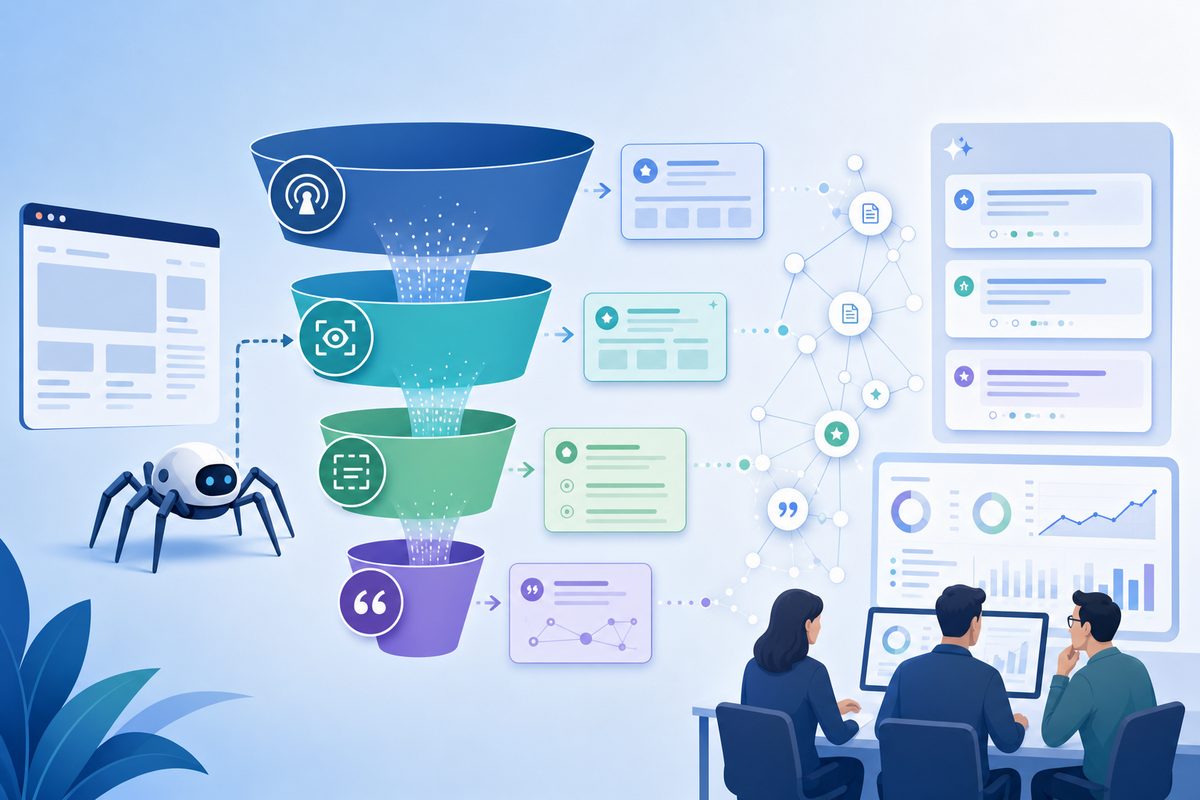
Everything above collapses into four sequential gates. A page must pass all four; failing any one produces the same outcome — silence.
| Gate | Question | Fails when | 60-second test |
|---|---|---|---|
| 1. Reach | Does the request get a 200 with real HTML? | Bot rules, geo-blocks, aggressive rate limits, interstitials | Load the page in a clean private window on a residential connection |
| 2. Render | Is the key content there without a click? | Tabs, accordions, infinite scroll, client-only fetches | Disable JavaScript, then view source and search for your core claim |
| 3. Parse | Does the structure carry meaning? | Empty links and buttons, div-soup tables, missing headings and labels | Run the page through a screen reader or the browser's accessibility inspector |
| 4. Quote | Is there a self-contained sentence worth repeating? | Claims split across sections, numbers only in images, marketing abstraction | Read one paragraph out of context — does it still assert something specific? |
Gates 1 and 2 are engineering work. Gates 3 and 4 are content work. Most teams we see have spent two years on gate 4 alone, which is why their answer engine optimization results plateau: the best-written paragraph on the internet loses to a plain one that the agent can actually reach.
What a gate-4 sentence looks like
The rewrite is mechanical. Put the entity, the number and the qualifier in one sentence that survives being lifted out of the page.
| Before (unquotable) | After (quoted verbatim in our runs) |
|---|---|
| "Flexible pricing that scales with your team." | "Team plan is $18 per user per month, billed annually, with a 5-seat minimum." |
| "Enterprise-grade security." | "SOC 2 Type II certified since 2023, with SAML SSO and SCIM on all paid plans." |
| "Integrates with the tools you already use." | "Native integrations with Salesforce, HubSpot, Slack and Snowflake; 40+ more via Zapier." |
| "Fast implementation." | "Median time to first dashboard is 9 days for teams under 50 people." |
Rule of thumb: if a sentence would still be true after you swapped in a competitor's name, an agent has no reason to quote it.
How the surfaces differ from each other
The four gates are universal. The weighting is not.
| Surface | How it gets content | Does robots.txt help you? | What it favours | Analytics footprint |
|---|---|---|---|---|
| ChatGPT Atlas | Live fetch in the user's Chromium session; agent mode acts in the current tab | Only for the OAI-SearchBot index, not the session fetch | ARIA-clean structure, initial-HTML content, top organic results | Reports as Chrome; referrals commonly tagged utm_source=chatgpt.com |
| Perplexity Comet | Live fetch plus persistent cross-tab context; assistant watches open tabs | Partially, via PerplexityBot for indexed retrieval | Source diversity, explicit citations, recency | Reports as Chrome |
| Copilot Mode in Edge | Reads the rendered content of open tabs with user permission | Indirectly, via the Bing index for grounded answers | Content already on screen; Microsoft describes reasoning across multiple open tabs and taking actions on request | Reports as Edge |
| Gemini in Chrome | Reads the active tab's rendered content | Indirectly, via Google's index for grounded answers | Google-indexed authority plus on-screen context | Reports as Chrome |
Two takeaways. First, Copilot and Gemini reward being open in a tab — which makes email, docs and partner placements a legitimate visibility channel, not just a demand-gen one. Second, Atlas is the harshest gate-1 and gate-3 surface because agent mode acts rather than summarises, and an action that fails is a session that ends.
Claude's browsing behaviour sits apart again — it cites fewer sources and weights official documentation more heavily than either, which we broke down in how Claude's recommendation behaviour differs from ChatGPT and Perplexity.
How to fix your site for AI browser visibility
Work the gates in order. Fixing gate 4 while gate 1 is broken changes nothing.
- Fetch your own top 20 pages as a session user. Clean profile, private window, residential IP, no extensions. Anything that is not a 200 with full HTML is a gate-1 failure. Check your WAF and bot-management rules for anything that challenges Chromium user agents on unusual timings.
- Move consent walls out of the way. Non-blocking banners, or a regional policy that does not gate content for the whole world. This is the single highest-yield fix we measured — 23% of ranked pages failed here.
- Put the answer in the initial HTML. Pricing, plan limits, integrations and comparison tables belong in server-rendered markup. Tabs and accordions are fine as a visual layer over content that already exists in the DOM.
- Repair the accessibility tree. Accessible names on every link and button, labels on every input, real
<table>markup for real tables, one<h1>, ordered headings, alt text that states the claim in the image. - Write claim-complete paragraphs. Every key section should assert something specific, with the number and the entity in the same sentence, readable with zero surrounding context.
- Publish machine-readable summaries. Structured data for products, pricing and organisation, plus an llms.txt file where it earns its keep — useful as a routing hint, not a substitute for fixing the page.
- Re-test monthly. Agents are non-deterministic and vendors ship weekly. A fix verified in April is an assumption in July.
A 30-day sequence that fits one sprint
Same list, ordered by what one small team can actually finish:
- Week 1 — diagnose. Run the gate-1 and gate-2 tests on your top 20 commercial pages. Log pass/fail per gate in a spreadsheet. Expect roughly a quarter to fail on consent alone.
- Week 2 — unblock. Ship the consent-wall change and the WAF exception. These are config, not code, and they move the most.
- Week 3 — server-render the numbers. Pricing, limits, integrations out of tabs and into initial HTML. Accessible names and labels on the same pages.
- Week 4 — rewrite the claims and re-measure. Apply the gate-4 sentence pattern to hero, pricing and comparison copy, then re-run the same prompt set and diff against week 1.
How to measure AI browser visibility when analytics says "Chrome"
You cannot count agentic sessions cleanly, and you should stop trying. Atlas, Comet and Dia are Chromium builds that report as Chrome, so in-browser traffic is already blended into your existing numbers with no separate bucket to isolate.
What you can measure is the output: run the prompts your buyers run, in the environments they run them in, on a schedule, and diff the answers. That is prompt-level tracking, and it is the only measurement that survives the disappearance of rankings and referrer data — the same problem we worked through for measuring visibility with no rankings and no Search Console data.
A workable measurement set for AI browser visibility:
- Paired-surface share of voice. Your mention rate in-chat versus in-browser for the same prompt set. A wide gap is a session-layer defect, not a content defect.
- Citation rate. How often an answer links you, not just names you.
- Description accuracy. What the answer says you do, and whether it is current.
- Shortlist position. Where you land in a three-name list, since in-browser lists are short.
- Gate diagnostics. Consent-wall hits, render failures and accessibility errors on your top commercial pages.
Two weak signals worth watching, given that clean attribution is gone: referral strings (chatgpt.com still tags some outbound clicks) and traffic shape — agentic sessions in our own logs skew toward single-page, sub-20-second visits with no scroll depth, which quietly worsens your engagement averages while representing successful retrieval.
Run the same prompts through multi-step research agents too — their sourcing behaviour is different again, as we found when mapping how deep research modes assemble citations.
What this study does not show
Three honest limits, because the numbers above are ours and you should know their edges.
Scope. English prompts, US IPs, eight B2B software categories, logged-out. Consumer categories, logged-in states and non-English markets will behave differently — sometimes dramatically, as brand strength rarely transfers across languages.
Volatility. Agents are non-deterministic. Three repeats per prompt smooths noise but does not eliminate it; treat single-prompt deltas as directional and category-level medians as reliable.
Moving targets. Atlas, Comet and Copilot all shipped changes during the study window. The mechanics — session-level fetch, accessibility-tree parsing, short shortlists — have been stable. The exact percentages will drift.
Frequently asked questions
Does blocking GPTBot hurt my AI browser visibility?
No. GPTBot collects training data only. Blocking it has no effect on whether Atlas can read your page in a live session, and no effect on ChatGPT citations. Blocking OAI-SearchBot is the one that removes you from in-chat citation candidates.
Can I block AI browsers if I want to?
Not reliably through robots.txt, since agentic browsers run inside a real user session and OpenAI states robots.txt may not apply to user-initiated fetches. Cloudflare's Web Bot Auth signed-agent scheme is the emerging mechanism for identifying and allowing or refusing them deliberately.
Why does my brand appear in ChatGPT chat but not in Atlas?
Almost always a gate-1 or gate-2 failure. Chat retrieval pulls from an index built by a well-behaved crawler that already got a clean copy of your page. The browser agent has to fetch it live, and a consent modal, a bot challenge or click-gated content stops it where the crawler sailed through.
Is accessibility work now an SEO task?
Functionally, yes. ARIA roles and accessible names are how agents identify what is on a page and what can be acted on. Accessibility remediation and AI browser visibility work are now largely the same backlog, which usually helps with budget approval.
Does AI browser visibility replace classic SEO?
No — it depends on it. In 78% of our Atlas runs the agent opened a top-three organic result before answering. Ranking is now the shortlist for what the agent reads, so losing position three costs you twice.
How long do fixes take to show up in answers?
Gate-1 and gate-2 fixes appear as soon as the agent next fetches the page, which is immediate — there is no index to wait for. Gate-3 and gate-4 changes showed up in our re-runs within days. Anything depending on an index (in-chat citations) still moves on crawler timelines, typically weeks.
How often should we re-test?
Monthly for the gate diagnostics, weekly for prompt-level tracking. Vendors ship frequently and answers shift without warning, so a quarterly cadence will find problems only after they have cost you a quarter of pipeline.