AI crawler access is whether bots like GPTBot, PerplexityBot, ClaudeBot, and Googlebot can fetch and parse your pages. If they can't, no amount of optimization gets you cited. Most generative engine optimization advice starts one layer too late—at content—and quietly assumes the machine already read the page. It often didn't.
This is the upstream technical layer. Before an answer engine can rank, quote, or recommend you, it has to (1) reach your server, (2) be allowed by your rules, (3) get a clean response, and (4) parse what comes back. Break any link and your best content is invisible—even if you rank #1 on Google.
Below: what each AI bot needs, the five places access silently breaks, a five-minute diagnostic, and a copy-paste checklist to fix it.
What is AI crawler access?
AI crawler access is the set of conditions that lets AI search bots fetch and read a URL: network reachability, robots.txt permission, a clean HTTP response, and HTML they can parse without running JavaScript. It is the prerequisite for every downstream goal—citations, mentions, and shortlist placement.
It's the difference between publishing a page and a model actually seeing it. SEO crawlability and AI crawler access overlap but aren't identical: Googlebot renders JavaScript and has crawled the web for decades, while most AI crawlers fetch raw HTML once and leave. A page that's perfectly indexable in Google Search can still be unreadable to ChatGPT and Perplexity—and that gap is where teams lose AI citations without ever knowing why.
Why AI crawler access is the layer GEO content skips
You cannot be cited by a source that never fetched your page. Every answer-engine optimization framework—entities, structure, llms.txt, FAQs—assumes the bot already pulled your HTML. When access is broken, all of it is wasted effort on a page no model has read.
An AI answer is assembled from content the system either trained on or retrieved live. Both paths run through a crawler. Block or break that crawler and you're absent from the candidate set before relevance is ever scored. This is why brands with strong organic rankings still go missing from AI answers: the ranking signal lives in Google's index, but the AI's retrieval crawler hit a wall.
So access deserves its own audit, separate from content. Run the full GEO checklist for AI search only after you've confirmed bots can reach the page—otherwise you're optimizing a page no engine sees. Access first, content second.
Which AI bots need access to your site?
At minimum, allow the retrieval and search crawlers from OpenAI, Anthropic, Perplexity, Google, and Microsoft. These power live citations. Training crawlers are optional—a separate decision. The table below maps the major bots, what they do, and whether they execute JavaScript.
| Bot (user agent) | Operator | Purpose | Renders JavaScript? |
|---|---|---|---|
| GPTBot | OpenAI | Trains foundation models | No |
| OAI-SearchBot | OpenAI | Indexes for ChatGPT search | No |
| ChatGPT-User | OpenAI | Live fetch when ChatGPT cites a page | No |
| ClaudeBot | Anthropic | Trains Claude models | No |
| Claude-SearchBot | Anthropic | Indexes for Claude search answers | No |
| Claude-User | Anthropic | Live fetch on a user's request | No |
| PerplexityBot | Perplexity | Builds Perplexity's answer index | No |
| Perplexity-User | Perplexity | Live fetch for a user's question | No |
| Googlebot | Search index + AI Overviews + AI Mode | Yes | |
| Google-Extended | robots.txt token for Gemini training/grounding (not a crawler) | n/a | |
| Bingbot | Microsoft | Bing index that feeds Microsoft Copilot | Limited |
| AppleBot | Apple | Siri / Apple Intelligence | Yes |
Each vendor documents its own crawlers: OpenAI's bot documentation, Anthropic's crawler help article, Perplexity's crawler docs, and Google Search Central's crawler overview.
Training bots vs. retrieval bots: the distinction that matters
You can block training and still be citable. Training crawlers (GPTBot, ClaudeBot) feed future models; retrieval crawlers (OAI-SearchBot, ChatGPT-User, Claude-SearchBot, Claude-User, PerplexityBot, Perplexity-User) pull pages into live answers. If your goal is to get recommended by ChatGPT today, the retrieval bots are non-negotiable—the training bots are a separate policy choice about whether your content is used to train models. Decide each deliberately; the block-or-allow trade-offs are covered below.
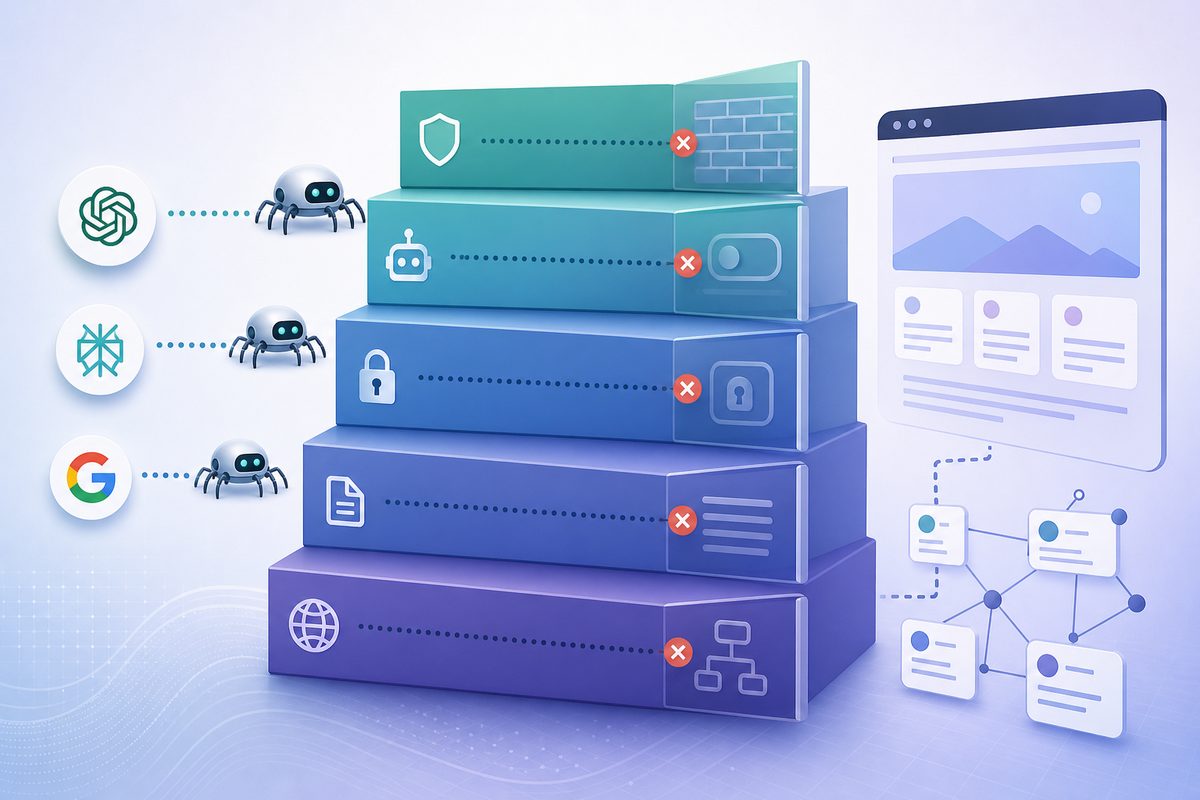
The AI crawler access ladder: five places access breaks
Access fails at one of five layers, in this order: edge/network, robots.txt, HTTP response, rendering, and parseability. Most guides only fix layer two. Diagnose top-down—a page blocked at the edge never even reaches its own robots.txt rules—and you find the real break fast.
Order matters: teams routinely spend a week rewriting content (a layer-five problem) when the actual failure is a bot-management rule at layer one. Check the cheap, common, upstream layers first.
Layer 1: Edge, CDN, and bot-management blocks
The most invisible failure: a WAF, CDN, or bot-management rule blocks the AI crawler before your application or robots.txt is ever consulted. Many platforms ship "block AI bots" toggles enabled by default, and security rules often challenge or 403 unfamiliar user agents.
Cloudflare now blocks AI crawlers at the network level by default for new sites, and reports blocking AI bots on the order of a billion requests per day across its network. A Disallow you never wrote, enforced by infrastructure you didn't configure, is the single most common reason a well-built page is unreadable to ChatGPT and Perplexity. Check your CDN's bot settings before anything else.
Layer 2: robots.txt disallow rules
The second-most-common block is an explicit Disallow in robots.txt targeting an AI user agent. CMS templates, SEO plugins, and "protect my content" presets add these silently. Open yoursite.com/robots.txt and look for any Disallow: / under GPTBot, OAI-SearchBot, ChatGPT-User, ClaudeBot, PerplexityBot, or Google-Extended.
One nuance trips teams up constantly: Google-Extended only controls whether your content trains Gemini—it does not affect Googlebot, search indexing, or AI Overviews. AI Overviews and AI Mode draw on the standard Google index crawled by Googlebot, per Google Search Central. So disallowing Google-Extended is a training-data choice, not a visibility lever. Blocking Googlebot, on the other hand, removes you from Search and AI Overviews together.
Layer 3: HTTP status, redirects, and timeouts
Even when allowed, a crawler needs a fast 200 OK—not a 404, a redirect chain, or a timeout. AI crawlers are unforgiving: they fetch once and rarely retry.
Vercel's network analysis of AI crawler traffic found ChatGPT's crawler spent 34.82% of its fetches on 404 pages and another 14.36% following redirects, with Claude's crawler showing a near-identical ~34% 404 rate (see Vercel's "The rise of the AI crawler"). That means roughly half of some bots' effort is wasted on dead URLs and detours. Stale sitemaps, broken internal links, and long redirect hops quietly burn your access. Serve the live URL directly, keep redirects to a single hop, and keep response times low.
Layer 4: JavaScript rendering
Most AI crawlers do not run JavaScript. They read the raw HTML in the initial response and nothing else. If your main content is injected client-side, the bot sees an empty shell.
Vercel's data is blunt here: across 569 million GPTBot fetches and 370 million Claude fetches in a single month, it found no evidence of JavaScript execution—the bots fetch JS files (ChatGPT 11.5%, Claude 23.8% of requests) but never run them. The confirmed exceptions are Googlebot (and therefore Gemini and AI Overviews) and AppleBot, which render. So a client-side-rendered SPA can be fully visible in Google AI Overviews yet completely blank to ChatGPT, Perplexity, and Claude. Server-side render or pre-render your critical content.
Layer 5: Parseability and structure
Once the HTML is fetched, the model still has to extract meaning from it. Buried text, content locked behind interactions, infinite-scroll bodies, and important facts that live only inside images all reduce what a crawler can actually use.
This is the boundary where access ends and optimization begins. The page is reachable, allowed, healthy, and rendered—now structure decides how much of it becomes a quotable passage. Clear headings, semantic HTML, real text instead of text-in-images, and self-contained paragraphs make extraction reliable. A standardized signal like an llms.txt file can help here, though it complements—never replaces—clean, parseable HTML.
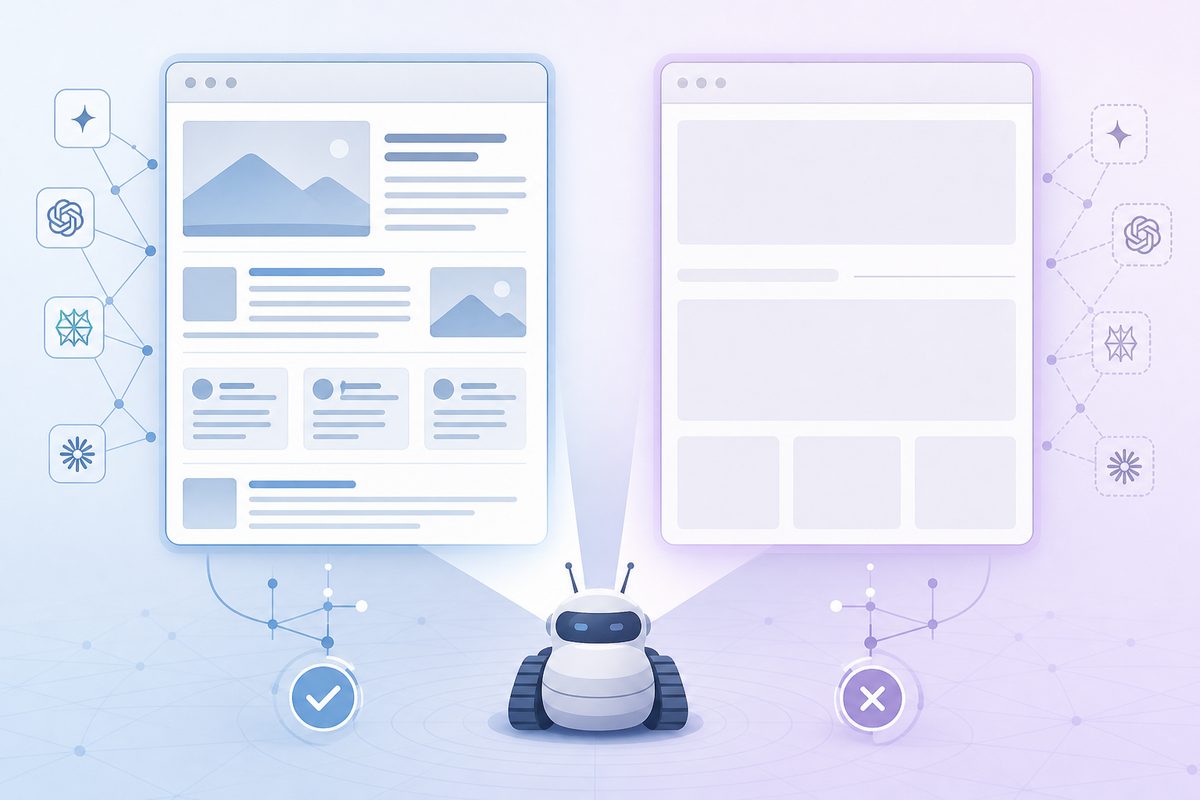
A worked example: ranks on Google, invisible in ChatGPT
Here's a pattern we see repeatedly in AI visibility tracking: a B2B SaaS page sits in the top three on Google for its category term, yet never appears when ChatGPT or Perplexity answer the same question. The instinct is to blame the content. The content is usually fine. Walk the ladder.
The diagnosis runs in order:
- Edge (layer 1): Fetch the URL with a
GPTBotuser agent. A403or a challenge page means a CDN rule is blocking before robots.txt—fix it here and stop. - robots.txt (layer 2): A plugin had added
Disallow: /underOAI-SearchBotandPerplexityBotwhile leaving Googlebot fully allowed. That single mismatch explains the exact symptom: visible to Google, invisible to AI retrieval. - Response (layer 3): Confirm a direct
200, not a redirect from a non-canonical URL the AI bot was given. - Rendering (layer 4): View source (not the inspector). If the body text isn't in the raw HTML, the SPA is the culprit.
Eight times out of ten in our experience, the break is at layer 1 or layer 2—an access rule nobody chose on purpose, not a content gap. The fix is a config change, and recovery in AI answers follows the next crawl cycle. This is why we treat access as a measurable input and not an assumption; you can establish yours with a no-code GEO audit baseline—and it's the most common reason a page ranks #1 on Google yet vanishes from AI answers.
The AI crawler access checklist
Use this checklist to confirm every AI bot can reach, fetch, and read your key pages. Work top-down; stop and fix at the first failure before moving on.
- Edge: Disable "block AI bots" defaults in your CDN/WAF; allowlist GPTBot, OAI-SearchBot, ChatGPT-User, ClaudeBot, Claude-SearchBot, Claude-User, PerplexityBot, Perplexity-User, Googlebot, Bingbot.
- robots.txt: No
Disallow: /on any retrieval crawler you want citing you. - Google-Extended: Set it deliberately—blocking it stops Gemini training only, not AI Overviews.
- Status codes: Key URLs return a direct
200; no soft 404s; sitemap lists only live, canonical URLs. - Redirects: One hop maximum; no chains; canonical and linked URLs match what bots are given.
- Rendering: Primary content is in the raw HTML (server-side rendered or pre-rendered), not injected by JavaScript.
- Parseability: Important facts are real text, not locked in images, tabs, or scroll-triggered loads.
- Speed: Fast time-to-first-byte; no aggressive rate-limiting that throttles bursty AI crawlers.
- Verify: AI bot user agents appear with
200s in your server logs.
How to test AI crawler access in 5 minutes
The fastest test is to fetch your own page while pretending to be each AI crawler and inspect the raw response. Run these checks:
- Curl as a bot:
curl -A "GPTBot" -I https://yoursite.com/page— confirmHTTP/2 200, not403or301. Repeat withPerplexityBotandClaudeBot. - Read the raw body:
curl -A "OAI-SearchBot" https://yoursite.com/pageand check your main content is present in the returned HTML. - Check robots.txt: Open
/robots.txtand scan every AI user agent forDisallow. - Scan server logs: Filter for
GPTBot,ClaudeBot,PerplexityBotand confirm recent200responses, not blocks. - Compare to Google: If Googlebot gets
200but AI bots get403, the break is layer 1 (edge), not content.
Copy-paste robots.txt to allow AI retrieval crawlers
This block explicitly allows the bots that produce live AI citations. Adjust the training crawlers to your policy.
# Retrieval crawlers — allow to be cited in AI answers
User-agent: OAI-SearchBot
Allow: /
User-agent: ChatGPT-User
Allow: /
User-agent: Claude-SearchBot
Allow: /
User-agent: Claude-User
Allow: /
User-agent: PerplexityBot
Allow: /
User-agent: Perplexity-User
Allow: /

# Training crawlers — allow or Disallow per your content policy
User-agent: GPTBot
Allow: /
User-agent: ClaudeBot
Allow: /

User-agent: *
Allow: /
Note: robots.txt is the polite layer. It does nothing if a CDN blocks bots upstream (layer 1), and a small minority of crawlers ignore it—Cloudflare documented Perplexity using stealth, undeclared crawlers to evade no-crawl directives. Robots.txt controls the well-behaved bots; your edge controls the rest.
Should you block or allow AI crawlers?
Allow the retrieval bots if you want AI visibility; treat training bots as a separate, defensible choice. The economics are lopsided, which is why the debate exists.
AI crawlers crawl heavily and refer little. Cloudflare's mid-2025 data put Google at roughly 14 crawls per referral, OpenAI at about 1,700:1, and Anthropic near 73,000:1—AI bots pull thousands of pages for every visitor they send back. If your business depends on direct traffic, blocking training crawlers is rational. But blocking retrieval crawlers to save bandwidth also deletes you from the answers your buyers now read instead of clicking. For most brands, the visibility is worth more than the saved requests.
After access: turning a fetched page into a cited one
Access gets you into the candidate set; structure and authority get you quoted. Once bots can read the page, the GEO work begins—self-contained passages, clear entities, and corroborating off-site mentions.
Access is necessary, not sufficient. A perfectly reachable page with vague, unstructured content still loses to a competitor whose facts are easy to extract. The next steps live downstream: write quotable, answer-first passages, build the entity and brand signals answer engines can understand, then measure whether any of it moved your share of voice. Treat access as the gate, content as the path, and AI search monitoring as the scoreboard that tells you which crawls turned into citations.
Frequently asked questions
Does blocking GPTBot remove my brand from ChatGPT?
Not from live answers. GPTBot is the training crawler. ChatGPT's live citations come from OAI-SearchBot and ChatGPT-User, which are separate user agents. To stay citable while opting out of training, allow OAI-SearchBot and ChatGPT-User and disallow only GPTBot. Blocking all three removes you from both training and live retrieval.
Does Google-Extended stop my content from appearing in AI Overviews?
No. Google-Extended only controls whether your content is used to train and ground Gemini. AI Overviews and AI Mode are part of Google Search and use the standard index crawled by Googlebot. To affect AI Overviews you'd have to limit Googlebot or use snippet controls—both of which also reduce your normal Search visibility.
Do AI crawlers render JavaScript?
Mostly no. GPTBot, OAI-SearchBot, ChatGPT-User, ClaudeBot, and PerplexityBot fetch raw HTML and do not execute JavaScript, per network-scale analysis from Vercel. The exceptions are Googlebot (which powers Gemini and AI Overviews) and AppleBot. If your content is client-side rendered, server-side render or pre-render it so AI crawlers see real text.
How do I know if an AI crawler can actually access my page?
Fetch it as the bot: curl -A "GPTBot" -I https://yoursite.com/page and confirm a 200. Then read the raw HTML body to verify your content is present without JavaScript. Cross-check robots.txt for Disallow rules and your server logs for AI bot user agents returning 200s.
How long until AI search reflects my fix?
It depends on each crawler's recrawl cadence, not your deploy. OpenAI's documentation notes roughly 24 hours between a robots.txt change and its systems reflecting it; retrieval crawlers then have to refetch the page before it can surface in answers. Edge and robots.txt fixes propagate fastest, while rendering and content changes wait for the next full crawl—days to weeks for low-traffic pages.
Will allowing AI crawlers hurt my SEO or overload my server?
It won't hurt rankings—AI crawler access and Google Search indexing are independent. The real cost is request volume, since AI bots crawl aggressively relative to referrals. If load is a concern, rate-limit rather than block, and prioritize allowing the retrieval crawlers that generate citations over the high-volume training crawlers.